Run OpenClaw in Docker with a local Ollama model and Discord
· in self-hosted AI
Tested on Fedora 44 with Docker 29.9.2, the official OpenClaw 2026.11.1 image, Ollama 0.30.10 and qwen3.5:9b on an RTX 3090 (24 GB), with Discord as the chat channel, on 8 November 2026.
This guide runs the OpenClaw AI assistant in Docker on a home server, with a model served by Ollama on the same machine and a private Discord bot as the chat window. At the end, the model runs on your own hardware and only the chat messages pass through Discord. The web panel is reachable only from the server, and you know what reply times to expect.
OpenClaw is an open-source agent. It runs as a long-lived "gateway" process, connects to chat apps such as Discord, Telegram or WhatsApp, and can call tools: read and write files in its workspace, run commands and browse. The official docs cover Docker and cloud models well. This guide adds the parts a home server needs: a local model, ports that stay off your network, and numbers from a real install.
Facts about the tools link to the page they come from. Figures without a link were measured in this test.
What you need
- A Linux machine with Docker Engine and Docker Compose v2. The test box ran Fedora 44 with Docker 29.9.2. The OpenClaw docs also list Docker Desktop on macOS and Windows.
- Ollama with at least one model that supports tool calls. This guide uses
qwen3.5:9b, a 6.6 GB download. Ollama reports it as supporting completion, tools, vision and thinking. - Enough memory for the model. On the test box the model took about 6.3 GB of GPU memory. OpenClaw also loaded an embedding model for its memory search, and the two together used 14.7 GB of the 24 GB card. The gateway container itself used 2.4 GB of RAM when idle.
- A Discord account, for the chat bot. You can use the web panel without one.
- About 3 GB of disk for the image (2.9 GB for
ghcr.io/openclaw/openclaw:2026.11.1) plus space for the models.
The test machine is a desktop with an RTX 3090, not a small box. The gateway is light, but the model is not, and OpenClaw sends a large prompt with every request (see the test results). If your server has no GPU, keep the gateway on it and point it at Ollama on a machine that has one. Choosing home server hardware covers the trade-offs of each type of machine.
An agent that can run commands is a different risk from a chat bot. Anyone who can talk to it can ask it to read files in its workspace, and a message can lead the model to run commands you did not intend. This guide keeps the gateway off your network and limits the bot to you. Do not open its ports on your router; the port forwarding guide explains what that exposes.
Check that Docker can reach Ollama
OpenClaw in a container reaches services on the host through the name host.docker.internal. The official docker-compose.yml maps that name to the host with host-gateway, which makes it work on Linux as well as Docker Desktop. Ollama must listen on an address the container can reach, not only on 127.0.0.1.
If Ollama runs as a Docker container, start it with the GPU and its port published, as in the Ollama Docker docs. An NVIDIA GPU needs the NVIDIA Container Toolkit installed first.
docker run -d --gpus=all -v ollama:/root/.ollama -p 11434:11434 --name ollama ollama/ollama
docker exec ollama ollama pull qwen3.5:9b
If Ollama runs directly on the host, the OpenClaw docs say to start it with OLLAMA_HOST=0.0.0.0:11434 ollama serve.
Ollama's API answered on the test box without any password, so a published port 11434 is open to every device on your network. Keep it closed on your router, and block it in the host firewall if other people share your network.
Get OpenClaw and pin a version
Clone the repository at a release tag so the setup script and the image match. The latest release on 8 November 2026 was v2026.11.1, published on 5 November.
mkdir -p ~/openclaw-home && cd ~/openclaw-home
git clone --depth 1 --branch v2026.11.1 https://github.com/openclaw/openclaw.git
cd openclaw
The repository has scripts/docker/setup.sh and a docker-compose.yml with two services: openclaw-gateway, which runs all the time, and openclaw-cli, for one-off commands. Without settings, the script builds an image from source, which the docs say needs at least 6 GB of RAM. Setting OPENCLAW_IMAGE uses the pre-built image from the project's GitHub registry instead. Use the version tag, not latest, so an update happens only when you choose it. The docs warn against unofficial mirrors of the image.
Run the setup script
By default OpenClaw keeps its config in ~/.openclaw on the host. The command below puts config, workspace and the secret key folder in one directory that is easy to back up. OPENCLAW_SKIP_ONBOARDING=1 skips the interactive questions, because the next section answers them with one command. OPENCLAW_TZ sets the time zone the agent sees; the default is UTC. Replace Europe/London with your own zone; the test box used Asia/Karachi.
mkdir -p ~/openclaw-home/data/workspace
OPENCLAW_IMAGE=ghcr.io/openclaw/openclaw:2026.11.1 \
OPENCLAW_CONFIG_DIR=$HOME/openclaw-home/data \
OPENCLAW_WORKSPACE_DIR=$HOME/openclaw-home/data/workspace \
OPENCLAW_AUTH_PROFILE_SECRET_DIR=$HOME/openclaw-home/data/auth-secrets \
OPENCLAW_SKIP_ONBOARDING=1 OPENCLAW_TZ=Europe/London \
./scripts/docker/setup.sh
The script writes these settings and a random gateway token to .env in the repository folder, so later docker compose commands use the same image and paths. It does not print the token. It also starts the gateway container, openclaw-openclaw-gateway-1.
Check that the container can reach Ollama:
docker compose exec openclaw-gateway curl -s http://host.docker.internal:11434/api/versionOn the test box this returned {"version":"0.30.10"} with no firewall change.
Keep the config folder on a local disk. The OpenClaw docs warn that NFS, SMB and CIFS shares can corrupt its SQLite databases. They also say that login tokens are stored in plain text there, so treat the folder and its backups as secrets.
Docker Compose override: keep the ports off your network
The setup script binds the gateway to lan inside the container, and the compose file publishes ports 18789 (gateway and web panel), 18790 (bridge) and 3978 (Microsoft Teams) on every interface. Any device on your network could reach the web panel. A docker-compose.override.yml file next to docker-compose.yml fixes that, and Compose loads it automatically:
services:
  openclaw-gateway:
    env_file:
      - path: .env
        required: false
      - path: ../discord.env
        required: true
    ports: !override
      - "127.0.0.1:18789:18789"
      - "127.0.0.1:18790:18790"
!override replaces the port list instead of adding to it, and the Teams port goes away. The env_file part loads the Discord token from a separate file, which you create later in this guide. Until then, comment out the ../discord.env entry.
The gateway log still warns that it is "binding to a non-loopback address". That refers to the address inside the container. On the test box, curl http://127.0.0.1:18789/ on the server returned 200, and the same request to the server's LAN address was refused.
Connect OpenClaw to Ollama
Onboarding sets the model provider and the gateway login. The first attempts on the test box failed while the gateway was running. docker compose run --rm openclaw-cli onboard stopped with "The CLI command failed", and openclaw doctor explained that it "cannot verify Gateway ownership" from a different process namespace. Running the same command inside the gateway container with exec gave "undergoing offline maintenance".
What worked: stop the gateway, wait about 90 seconds for its heartbeat to expire, then run onboarding in a one-off container.
docker compose stop openclaw-gateway
sleep 90
docker compose run --rm --no-deps --entrypoint node openclaw-gateway dist/index.js onboard \
  --non-interactive --accept-risk --mode local --no-install-daemon \
  --gateway-auth token --gateway-token-ref-env OPENCLAW_GATEWAY_TOKEN \
  --skip-ui --suppress-gateway-token-output --skip-channels --skip-search --skip-health \
  --auth-choice ollama --custom-base-url "http://host.docker.internal:11434" \
  --custom-model-id "qwen3.5:9b"
The output ends with "Default Ollama model: qwen3.5:9b". Leave /v1 off the base URL. The OpenClaw docs say it talks to Ollama's native API, and the OpenAI-compatible /v1 address breaks tool calls. A local Ollama does not need an API key.
Don't start the gateway yet. Discord comes first.
Create a private Discord bot
The bot is a Discord application that only you can add to a server. Do this in the Discord Developer Portal while logged in to Discord.
- Open discord.com/developers/applications, click New Application, give it a name and accept the developer terms.
- Open Bot. Under Privileged Gateway Intents, turn on Message Content Intent; without it the bot cannot read normal server messages. The OpenClaw docs also recommend Server Members Intent. Save.
- Open Installation and set Install Link to None. Save.
- Back on Bot, turn off Public Bot so only you can invite it. Save. If you try this before step 3, Discord refuses with "Private application cannot have a default authorization link".
- On Bot, click Reset Token and copy the token. Discord shows it once.
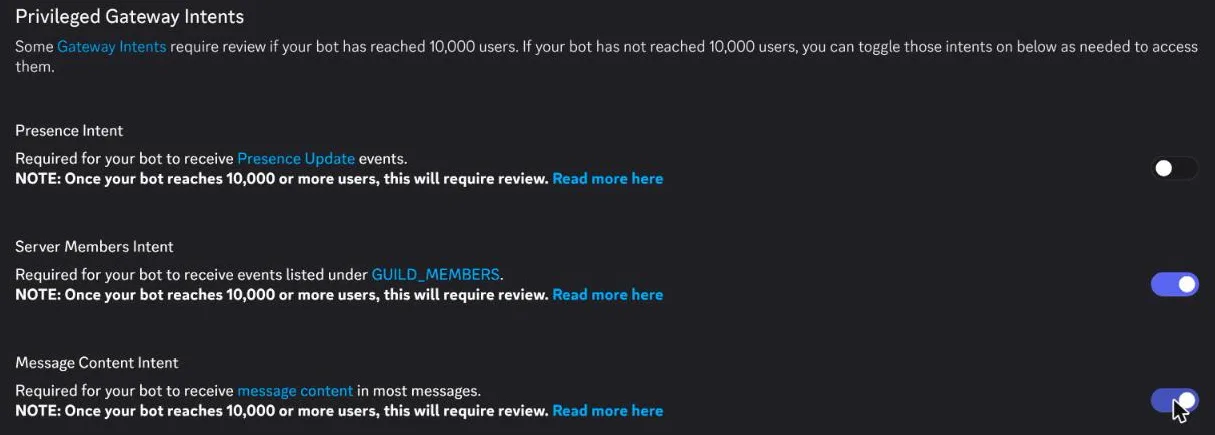
On the test box, the browser's autofill put an email address into the bot's Username field each time the Bot page loaded. Check that field before every save.
The bot needs a server, and you need the Manage Server permission there. A new server of your own is the simplest: in Discord click Add a Server, then Create My Own. Then open this invite link with your application ID from General Information:
https://discord.com/oauth2/authorize?client_id=APPLICATION_ID&permissions=274878024768&integration_type=0&scope=bot+applications.commandsThe number grants the baseline from the OpenClaw docs: View Channels, Send Messages, Embed Links, Attach Files, Read Message History, Add Reactions and Send Messages in Threads. The OAuth2 → URL Generator page builds the same link if you tick those boxes. Discord showed a captcha after Authorize.
Give OpenClaw the Discord token
Keep the token out of the config file and out of your shell history. Create ~/openclaw-home/discord.env in an editor with one line, then make it readable only by you:
DISCORD_BOT_TOKEN=paste-the-token-herechmod 600 ~/openclaw-home/discord.envUncomment the ../discord.env line in the override file. The config then refers to the variable instead of holding the token. Save this as ~/openclaw-home/data/discord.patch.json5, with your own IDs:
{
  channels: {
    discord: {
      enabled: true,
      token: { source: "env", provider: "default", id: "DISCORD_BOT_TOKEN" },
      applicationId: "APPLICATION_ID",
      groupPolicy: "allowlist",
      guilds: {
        "SERVER_ID": { requireMention: true, users: ["YOUR_USER_ID"] },
      },
    },
  },
}
groupPolicy: "allowlist" makes the bot ignore every server except the one listed. users limits it to you, and requireMention makes it answer only when mentioned. To find the server and user IDs, turn on Developer Mode in Discord's user settings, then right-click the server or your name and choose Copy ID.
The data folder is mounted at /home/node/.openclaw in the container, so apply the patch from there and start the gateway:
docker compose run --rm --no-deps --entrypoint node openclaw-gateway dist/index.js \
  config patch --file /home/node/.openclaw/discord.patch.json5
docker compose up -d openclaw-gateway
The patch reported "Applied 6 config update(s)". Use up -d openclaw-gateway, not a plain docker compose up -d. The plain command also starts the openclaw-cli service as a long-running container, which is meant only for one-off run --rm commands. The docs also note that docker compose restart does not pick up changed environment files, so use up -d after you edit one.
Watch the log with docker compose logs -f openclaw-gateway. On the test box it showed agent model: ollama/qwen3.5:9b and "Discord bot check resolved" about ten seconds after start, and Docker marked the container healthy after about a minute.
Test it in Discord
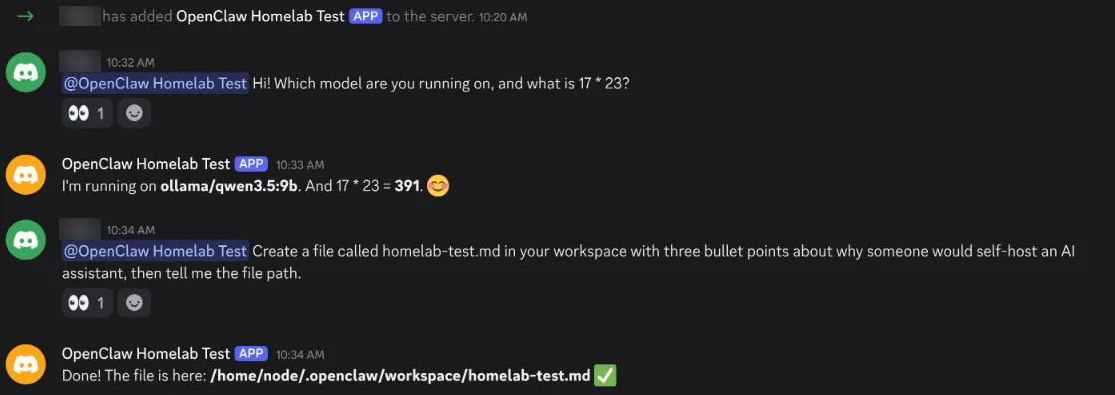
In your server's channel, mention the bot and ask something you can check. The test message was "Which model are you running on, and what is 17 * 23?". The bot added an 👀 reaction within a second, showed "is typing…", and answered that it ran on ollama/qwen3.5:9b and that 17 × 23 is 391. Both are correct.
In the Discord web client, typing @ and the bot name gave no suggestion on the test server. Typing <@APPLICATION_ID> works and turns into a mention when sent.
Then test a tool. The second message asked the bot to create homelab-test.md in its workspace with three points about self-hosting an AI assistant. It replied with the path /home/node/.openclaw/workspace/homelab-test.md, and the file appeared on the host in ~/openclaw-home/data/workspace/.
Direct messages and pairing
By default the bot does not answer direct messages from people it does not know. When you first message it, it replies with your Discord user ID and an eight-letter pairing code, and the model is not called. Approve the code on the server; this command works while the gateway runs:
docker compose exec openclaw-gateway node dist/index.js pairing list discord
docker compose exec openclaw-gateway node dist/index.js pairing approve discord CODE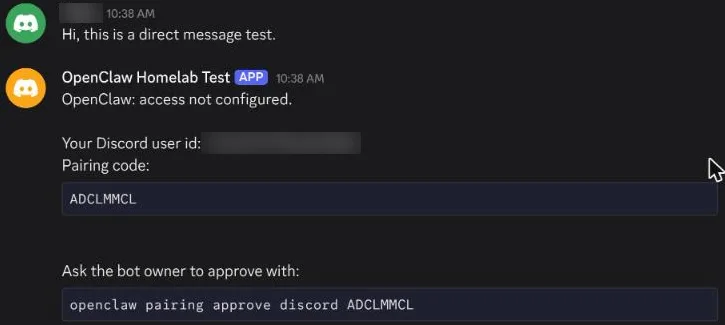
The OpenClaw docs say codes expire after one hour. The first person you approve also becomes the command owner: the output said "Command owner configured", because no owner was set. After approval, the bot answered direct messages normally. Asked for its time zone, it named the one set in OPENCLAW_TZ, Asia/Karachi.
Open the web panel
On the server, open http://127.0.0.1:18789/. The panel asks for the gateway token, which is the OPENCLAW_GATEWAY_TOKEN line in the repository's .env. Paste it under Gateway secret and click Connect. The setup script allowed only localhost and 127.0.0.1 as origins, so the panel is meant to be opened on the server itself. From another computer, use an SSH tunnel such as ssh -L 18789:127.0.0.1:18789 you@server and open the same address; the SSH guide explains tunnels and keys.
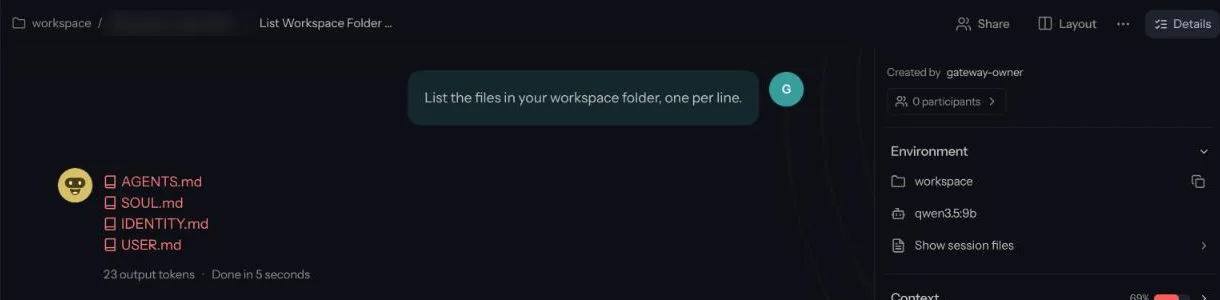
The panel lists the Discord conversations, the model, how much of the context window each session uses, and scheduled automations. The test install had one automation, heartbeat-main, which runs every 30 minutes. The agent wakes on that schedule, so the model gets called even when nobody chats.
How to open OpenClaw in the terminal
OpenClaw's terminal chat is openclaw tui, a text interface that connects to the running gateway. In this Docker setup the openclaw command lives in the container, so run it there:
docker compose exec openclaw-gateway openclaw tuiOn the test box it connected to ws://127.0.0.1:18789 with agent main and session main, and showed that session's earlier messages. The status line listed the model, qwen3.5:9b, and the context in use, 17k of 33k tokens. Type a message and press Enter. Asked "Which model are you running on, and what is 19 * 21?", it answered ollama/qwen3.5:9b and 399 after 24 seconds, with the model not yet loaded.
Two other ways to start it did not work here:
docker compose run --rm openclaw-cli tuistopped with "The CLI command failed", the same error onboarding gave while the gateway ran.openclaw chatandopenclaw terminalare aliases foropenclaw tui --local, which runs the agent without the gateway. The docs say local mode refuses to start while a gateway owns the data folder, so use it only on an install with no gateway running.
Inside the TUI, commands start with a slash: /help lists them, /status shows the session and model, and /model switches the model for this session. Leave with /exit or Ctrl+D; Ctrl+C clears the input, and a second press exits.
Other OpenClaw terminal commands run the same way, as docker compose exec openclaw-gateway openclaw <command>. For example, openclaw models status printed the default model, ollama/qwen3.5:9b, and the config path. On an install without Docker, start the gateway with openclaw gateway and run openclaw tui in a second terminal, as the TUI guide shows.
What to expect from a 9B model
These numbers come from the Ollama log on the test machine (RTX 3090, qwen3.5:9b, Ollama loaded the model with a 32,768-token context):
| Request | Total time | Details |
|---|---|---|
| First message, model not loaded | 1 min 10 s | About 59 s loading the model, then 10 s reading an 18,415-token prompt at 1,838 tokens/s |
| Tool call (create a file), model loaded | 2.8 s + 0.7 s | Two model calls; the cached prompt meant only 524 and 253 new tokens |
| Question after a restart | 1.9 s | 2,412 prompt tokens processed |
| Web panel: list workspace files | 5 s | 23 output tokens |
The model wrote at 91 to 96 tokens per second. The cost to watch is the prompt: a one-line question became 18,415 tokens, because OpenClaw sends its system prompt, tool definitions and workspace files with it. The gateway log estimated the prompt at 24,608 tokens, against a prompt budget of 24,576 tokens for this model, so the base prompt alone filled the budget. A slower GPU or a CPU needs much longer to read that prompt the first time.
The answers showed the limits of a small model:
- Arithmetic, file creation and following the allowlist all worked.
- The file it wrote had one Chinese word in the middle of an English sentence.
- After a restart it said it had "lost" the earlier conversation, though the session history and the file were still there. When told to use its read tool, it opened the file and listed its contents correctly.
- Asked in the web panel to list its workspace, it named four files and missed the test file and a folder. It answered from the files in its prompt instead of reading the folder.
- It misspelled Karachi as "Karahi" when giving its time zone.
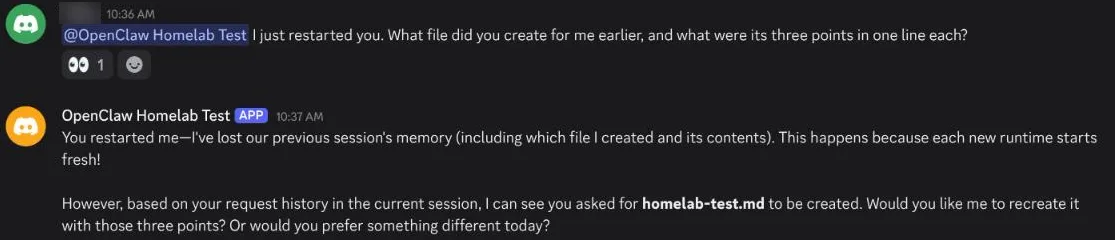
Naming the tool in your request ("use your read tool to …") made the model check instead of guessing. A larger model may need less of this. A 27B model did not fit in the GPU memory left on the 24 GB card in this test, so it was not tried.
How to change the model in OpenClaw
Onboarding sets the first model. To change OpenClaw's default model later, pull the new model in Ollama, then set it with openclaw models set. The test switched to the smaller qwen3.5:4b, which Ollama lists with tool support:
docker exec ollama ollama pull qwen3.5:4b
docker compose exec openclaw-gateway openclaw models set ollama/qwen3.5:4b
The command printed "Default model: ollama/qwen3.5:4b" and saved a backup of the old config as openclaw.json.bak. It also warned that the model "is not in the local model catalog". The docs say self-hosted models may not be in the catalog yet, and the setting is still saved. Check the model name with ollama list if you see the warning.
No restart was needed. The gateway log showed "config hot reload applied" under a second later, and the next question in the terminal chat was answered by ollama/qwen3.5:4b. Run docker compose exec openclaw-gateway openclaw models status to see the current default. To go back, run models set again with the old model.
To change the model for one conversation only, use /model in the terminal chat: /model ollama/qwen3.5:9b replied "model set to ollama/qwen3.5:9b", and the next answer came from the 9B model. models status still showed the 4B model as the default. /model default returns the session to the default model.
Restarts, updates and backups
The compose file sets restart: unless-stopped, so the gateway comes back after a reboot once Docker starts. After docker compose down and docker compose up -d openclaw-gateway, the test install was healthy again in 57 seconds with its config, Discord link, session history and workspace intact. Everything lives in the data folder (131 MB after testing), so back up that folder and the two .env files.
To update, change the tag in OPENCLAW_IMAGE in .env to the new release, then pull and restart the gateway, as the docs describe:
docker compose pull openclaw-gateway
docker compose stop openclaw-gateway
docker compose up -d openclaw-gateway
The image runs openclaw doctor --fix on start to migrate the stored state. Run only one gateway per data folder.
If you paste the bot token anywhere it could be read, reset it on the Bot page, put the new token in discord.env and run docker compose up -d openclaw-gateway.
The Docker sandbox: leave it off unless you need it
Without the sandbox, the agent's tools run inside the gateway container. That container sees only the data folder and drops the NET_RAW and NET_ADMIN capabilities, as set in the compose file. Setting OPENCLAW_SANDBOX=1 runs tools in separate containers, but the compose file does that by mounting /var/run/docker.sock into the gateway. Access to that socket gives the container control of the host's Docker, which lets it start a container that mounts the whole host disk. This guide left the sandbox off. Turn it on only if you need tools that the gateway image doesn't have and you accept that risk.
When this setup is the wrong choice
A local 9B model is fine for short questions, notes and simple file tasks on your own server. It is a poor fit for jobs where it has to check things with its tools: in this test it skipped tools and gave wrong answers. Each request also takes a large prompt, so a server without a GPU will be slow. If you need better answers, OpenClaw also works with hosted models, but then your prompts leave the house. And if several people who don't trust each other need an assistant, the OpenClaw docs recommend a separate gateway for each of them.
Frequently asked questions
Can OpenClaw run in Docker with a local model?
Yes. Onboard it with --auth-choice ollama and the base URL http://host.docker.internal:11434, which the official compose file maps to the host. Leave /v1 off that address, because the OpenClaw docs say it breaks tool calls. On the test machine it used qwen3.5:9b through Ollama and answered in Discord.
How do I open OpenClaw in the terminal?
Run openclaw tui. In Docker, run it inside the gateway container with docker compose exec openclaw-gateway openclaw tui; on the test machine, running it through the openclaw-cli service failed. Leave with /exit or Ctrl+D.
How do I change the model in OpenClaw?
Pull the model in Ollama, then run openclaw models set ollama/MODEL. On the test machine the gateway applied the change without a restart. To switch for one conversation only, type /model ollama/MODEL in the terminal chat.
How much memory does OpenClaw need?
On the test machine the gateway container used 2.4 GB of RAM when idle. The model is the larger part: qwen3.5:9b used about 6.3 GB of GPU memory, and 14.7 GB together with the embedding model OpenClaw loaded.
Why does the OpenClaw CLI fail while the gateway is running?
While the gateway runs, onboarding fails with "cannot verify Gateway ownership". Stop the gateway, wait about 90 seconds, then run the command in a one-off container.
How do I let OpenClaw answer my Discord direct messages?
Message the bot to get a pairing code, then run pairing approve discord CODE in the gateway container. Codes expire after one hour, and the first approved user becomes the command owner.
Sources
- OpenClaw docs: Docker
- OpenClaw docs: Docker environment variables
- OpenClaw docs: Docker networking and storage
- OpenClaw docs: Ollama setup
- OpenClaw docs: Discord setup
- OpenClaw docs: Ollama
- OpenClaw docs: Pairing
- OpenClaw docs: openclaw tui
- OpenClaw docs: TUI
- OpenClaw docs: openclaw models
- OpenClaw docker-compose.yml at v2026.11.1
- OpenClaw scripts/docker/setup.sh at v2026.11.1
- OpenClaw v2026.11.1 release
- Ollama docs: Docker
- NVIDIA Container Toolkit install guide
- Docker docs: Docker daemon attack surface
- Discord developer docs: privileged intents