Ollama vs llama.cpp: the same GPU and model file, measured
· in self-hosted AI
Tested on Fedora 44 with Docker 29.9.2, an RTX 3090 (24 GB) and a Ryzen 9 5900X, comparing Ollama 0.40.15 with the llama.cpp server image build 12199, using Qwen3.5 9B and 27B Q4_K_M GGUF files, on 8 November 2026.
With the same model file and the same settings, Ollama and llama.cpp generated text at the same speed on an RTX 3090: their generation speeds were within 1 percent. The reason is that current Ollama runs llama.cpp's own server underneath. The real differences are in the defaults: how much context each one reserves, how much GPU memory that takes, and what happens when several requests arrive at once.
What is llama.cpp? It is the open-source engine that runs GGUF model files on CPUs and GPUs. Its llama-server program serves a model over HTTP, with an OpenAI-compatible API and a small web chat page. Ollama is a model manager and server: ollama pull downloads a model by name, Ollama loads it when a request arrives and unloads it when it sits idle. This page compares the two as servers on a home machine, in Docker, with numbers from one test machine.
Facts about the tools link to the page they come from. Figures without a link were measured in this test.
The short answer
- Speed is the same with the same settings. Both ran Qwen3.5 9B at about 121 tokens per second and Qwen3.5 27B at about 42 tokens per second on the RTX 3090.
- Ollama reserves less memory by default. On a 24 GB card it gave each model a 32,768-token context and used 6.5 GB of GPU memory for the 9B model. llama.cpp with no settings reserved the 9B model's full 262,144-token context and used 13.9 GB.
- llama.cpp handles parallel requests better by default. With four requests at once it served them together; Ollama answered them one after another unless you set
OLLAMA_NUM_PARALLEL. With the 27B model, setting it to 4 pushed part of the model onto the CPU and made Ollama slower, not faster. - Ollama is easier to run day to day. It downloads models by name, swaps them in and out of memory and unloads idle ones. llama-server serves the model you start it with, unless you set up its router mode.
- GPU heat changed the results more than the choice of tool. Without a cool-down between runs, the same server lost a quarter of its speed in five runs.
Is llama.cpp faster than Ollama?
Not when both use the same settings. In this test, llama.cpp and Ollama generated text within about 1 percent of each other with both models, on the GPU and on the CPU alone; the benchmark table has every figure. That is expected, because Ollama 0.40.15 runs llama.cpp's own llama-server to do the work. Where llama.cpp did come out ahead, the cause was a different default, not a faster engine:
- Several requests at once: llama.cpp starts four request slots by default and served four requests together at about 2.5 times Ollama's total speed. Ollama answers one request at a time unless you set
OLLAMA_NUM_PARALLEL. - Time to first token: with the 27B model, llama.cpp started answering 0.1 to 0.23 s sooner. With the 9B model there was no consistent difference.
A published test that measured llama.cpp at twice Ollama's speed used an older Ollama release. Different settings and back-to-back runs on a hot GPU can also produce gaps that large, as the sections below show with numbers.
Ollama runs llama.cpp inside it
Many comparisons describe Ollama as a modified copy of llama.cpp. That was roughly true for older versions, which built llama.cpp's code into Ollama's own runner. Since version 0.30, released in May 2026, Ollama starts upstream llama.cpp's llama-server as a separate process for every GGUF model it loads; a comment in Ollama's source code states this. Each Ollama release is built with one fixed llama.cpp version: Ollama 0.40.15 uses llama.cpp build 12111.
With OLLAMA_DEBUG=1, Ollama logs the exact command it starts. For the 9B model with default settings it was:
/usr/lib/ollama/llama-server --model /root/.ollama/models/blobs/sha256-03b7… \
  --port 44375 --host 127.0.0.1 --no-webui --offline -c 32768 -np 1 \
  --flash-attn auto -b 1024 -ub 1024 --context-shift --keep 4
The llama-server README lists what each of these arguments does:
-c 32768: the context size in tokens. Without it, llama-server uses the context the model was trained for.-np 1: the number of request slots, so one request is served at a time.--flash-attn auto: use Flash Attention where the hardware supports it, which is also llama-server's default.-b 1024 -ub 1024: the logical and physical batch sizes used while reading the prompt. llama-server's defaults are 2048 and 512.--context-shift --keep 4: when the context fills up, drop older tokens to keep generating, but keep the first 4 tokens of the prompt.--no-webui --offline: no chat page, and no network access for downloading models.
So the useful question is not which engine is faster. It is what Ollama adds around llama-server, and which defaults suit your machine. Because the command is in the log, you can start llama.cpp with the same flags and get the same behavior, which is what the test below does.
How the test was run
- Machine: Fedora 44, Docker 29.9.2, an NVIDIA RTX 3090 with 24 GB (driver 615.78.08), an AMD Ryzen 9 5900X with 12 cores and 24 threads, and 62 GB of RAM.
- Ollama: the
ollama/ollama:0.40.15image, released on 3 November 2026. - llama.cpp: the official
ghcr.io/ggml-org/llama.cpp:server-cudaimage, which reported build 12199 from 8 November 2026, with CUDA 12.8. - Models:
Qwen3.5-9B-Q4_K_M.gguf(5.7 GB) andQwen3.5-27B-Q4_K_M.gguf(16.7 GB) from the unsloth repositories on Hugging Face (9B, 27B). Both tools loaded these same files. After import, the file in Ollama's model store had the same SHA-256 checksum as the downloaded file. - Requests: a short prompt of about 70 tokens with 512 tokens generated, and a long prompt of about 4,120 tokens with 256 tokens generated. Each request started with a random ID, so neither server could reuse a cached prompt. Thinking was turned off and the temperature was 0.
- Measurements: prompt and generation speeds come from each server's own timing fields. Time to first token was measured by the client, from sending the request to the first word of the answer.
- Order and heat: the three setups took turns, and before each measured run the script waited until the GPU had cooled to 50 °C. Each number below is the median of five runs. The next section explains why.
The three setups were Ollama with its defaults, llama.cpp started with the flags Ollama used, and llama.cpp with no flags except the model file.
Why the GPU had to cool between runs
The first attempt ran each setup five times in a row. The 27B model on llama.cpp with Ollama's flags gave 41.9, 38.1, 33.1, 31.6 and 30.9 tokens per second, on the short prompt. During a repeat of that test the GPU reached 91 °C, its clock fell from 1,695 MHz to 1,395 MHz, and nvidia-smi reported thermal slowdown as the reason. Ollama's runs came after a pause in which the card cooled, so in that comparison Ollama looked up to 25 percent faster than llama.cpp with the same flags: 41.6 against 33.1 tokens per second. After the change to alternating runs with a cool-down, the difference was gone.
A single 512-token run of the 9B model heated the card from 50 °C to 84 °C in about four seconds. If you compare two servers on your own machine, alternate them and let the card cool, or a slower result may only mean the GPU was hotter.
llama.cpp vs Ollama performance: benchmark results
| Model and test | Ollama, defaults | llama.cpp, Ollama's flags | llama.cpp, defaults |
|---|---|---|---|
| 9B, generation (short prompt) | 120.6 tok/s | 121.8 tok/s | 121.6 tok/s |
| 9B, generation (long prompt) | 118.5 tok/s | 119.1 tok/s | 118.9 tok/s |
| 9B, reading the 4,120-token prompt | 4,648 tok/s | 4,575 tok/s | 4,378 tok/s |
| 9B, time to first token (long prompt) | 1.09 s | 1.01 s | 1.06 s |
| 27B, generation (short prompt) | 42.3 tok/s | 42.4 tok/s | 42.4 tok/s |
| 27B, generation (long prompt) | 41.8 tok/s | 41.7 tok/s | 41.7 tok/s |
| 27B, reading the 4,120-token prompt | 1,391 tok/s | 1,390 tok/s | 1,392 tok/s |
| 27B, time to first token (short prompt) | 0.37 s | 0.27 s | 0.27 s |
| 27B, time to first token (long prompt) | 3.37 s | 3.14 s | 3.14 s |
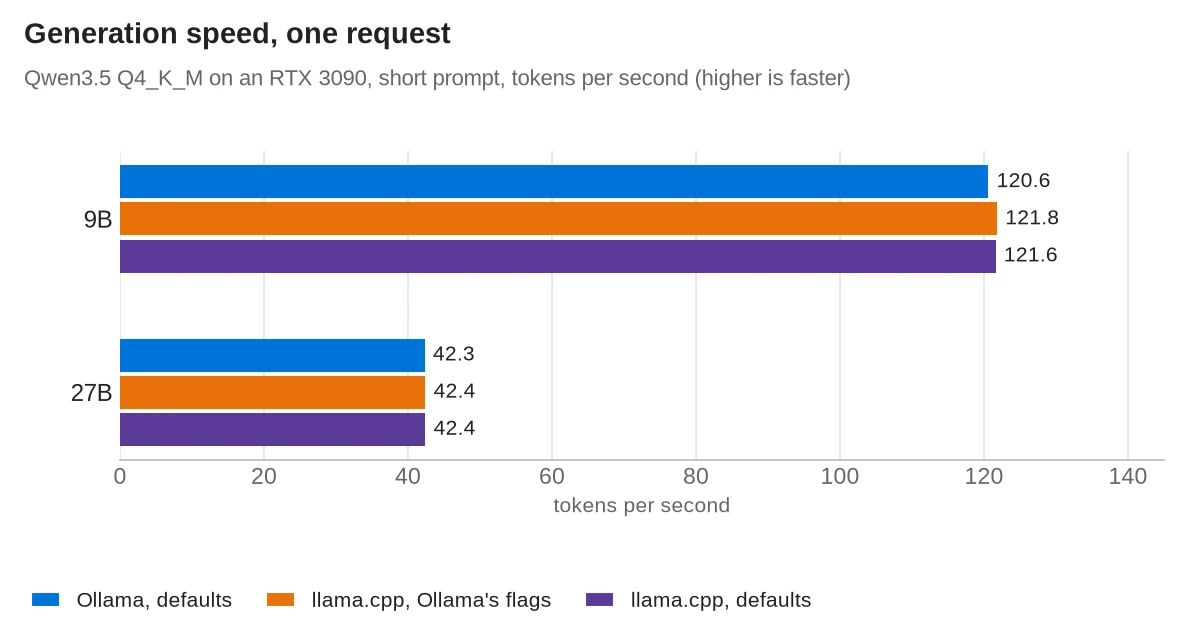
Generation speed differed by about 1 percent or less in every row, and the five runs of each setup spread by about the same amount. Both run llama-server, Ollama with build 12111 and the image with build 12199, so similar speed is expected.
The one repeatable difference was the wait for the first token with the 27B model: Ollama took about 0.1 s longer on the short prompt and 0.23 s longer on the long one. With the 9B model the three setups were within about 0.1 s of each other, and Ollama was not consistently the slowest. In a chat window, a tenth of a second before the answer starts is hard to notice.
Other published tests report much larger gaps. The Atomic Chat test measured llama.cpp at more than twice Ollama's generation speed on an RTX 5090 with an older Ollama release (0.33.2). The numbers here only cover Ollama 0.40.15 and llama.cpp build 12199 on this machine. Run-to-run heat, different settings and different builds are all common reasons for such gaps.
VRAM and context: where the defaults differ
The context is the number of tokens the model can hold at once: your prompt, the conversation so far and the answer. Each token of context needs GPU memory, so the context size the server reserves decides how much memory a model takes.
- Ollama picks the context from the GPU's memory. Its docs give 4,096 tokens below 24 GiB of VRAM, 32,768 tokens for 24 to 48 GiB, and 262,144 tokens above that. On the 3090 it used 32,768.
- llama-server uses the context the model was trained for when you don't set
-c. For both Qwen3.5 models that is 262,144 tokens. Its--fitoption, which is on by default, adjusts the settings you did not set, such as the context size, until the model fits in GPU memory with a 1,024 MiB margin. It also starts four request slots by default, which share that context.
| Setup | Context reserved | GPU memory used |
|---|---|---|
| 9B, Ollama defaults | 32,768 tokens, 1 request at a time | 6.5 GB |
| 9B, llama.cpp defaults | 262,144 tokens, shared by 4 slots | 13.9 GB |
| 9B, llama.cpp with Ollama's flags | 32,768 tokens, 1 slot | 6.5 GB |
| 27B, Ollama defaults | 32,768 tokens, 1 request at a time | 18.0 GB |
| 27B, llama.cpp defaults | 85,760 tokens (lowered by --fit), shared by 4 slots | 21.8 GB |
| 27B, llama.cpp with Ollama's flags | 32,768 tokens, 1 slot | 18.0 GB |
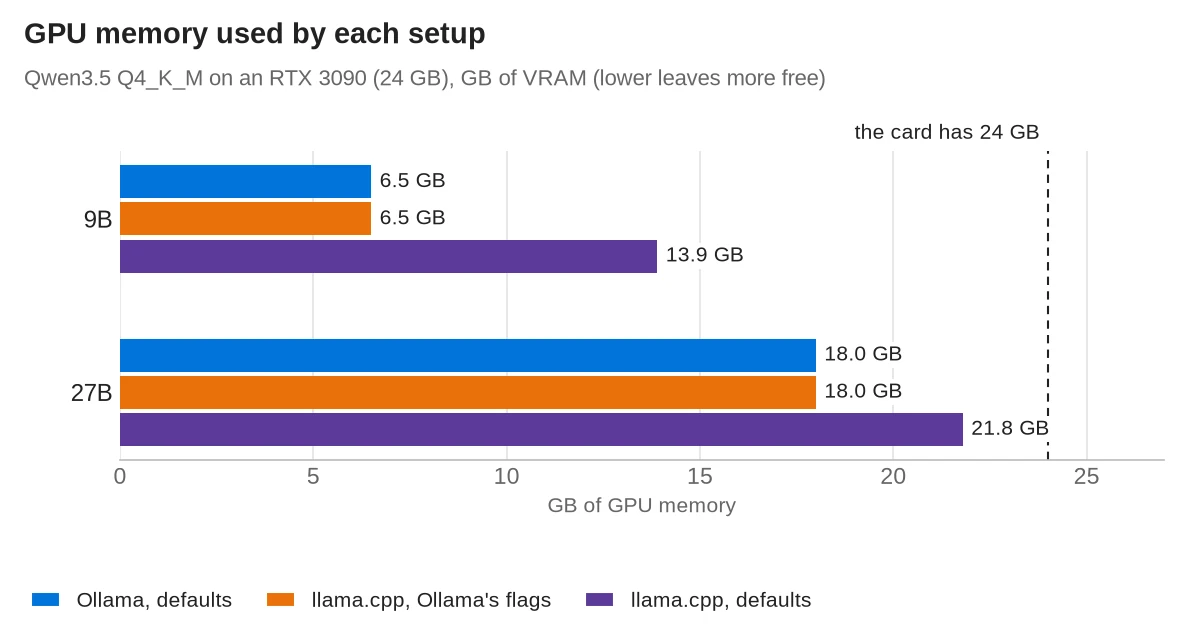
Neither default is wrong. Ollama's default leaves room on the card for a second model. llama.cpp's gives long conversations and agents more room, because a 32,768-token context fills up quickly with a large system prompt. The OpenClaw guide shows an agent sending more than 18,000 tokens for a one-line question. To change the context in Ollama, set OLLAMA_CONTEXT_LENGTH or the num_ctx option; in llama-server, set -c.
How to calculate the VRAM llama.cpp needs
GPU memory use is roughly the size of the GGUF file plus the memory for the context. In this test:
- 9B model (5.7 GB file): 6.5 GB with a 32,768-token context and 13.9 GB with 262,144 tokens.
- 27B model (16.7 GB file): 18.0 GB with 32,768 tokens and 21.8 GB with 85,760 tokens.
So the file size sets the minimum, and the context adds to it in proportion to its length. How much each token of context takes depends on the model, so these figures apply to Qwen3.5 only. The reliable way to size a model for your card is to start llama-server with the -c you want and read the memory use with nvidia-smi. If you leave -c out, llama-server's --fit option does the calculation and lowers the context until the model fits.
Several requests at once
A home server often has more than one client: a chat window, an agent and a script, all sending requests to the same model. This test sent four requests at once, each asking for 256 tokens, and measured the total output per second. Each figure is the median of three rounds, with the same cool-down as before.
| Setup | 9B, total tok/s | 27B, total tok/s |
|---|---|---|
Ollama defaults (OLLAMA_NUM_PARALLEL=1) | 114.5 | 39.8 |
Ollama with OLLAMA_NUM_PARALLEL=4 | 266.4 | 33.1 |
| llama.cpp defaults (4 slots) | 292.7 | 100.2 |
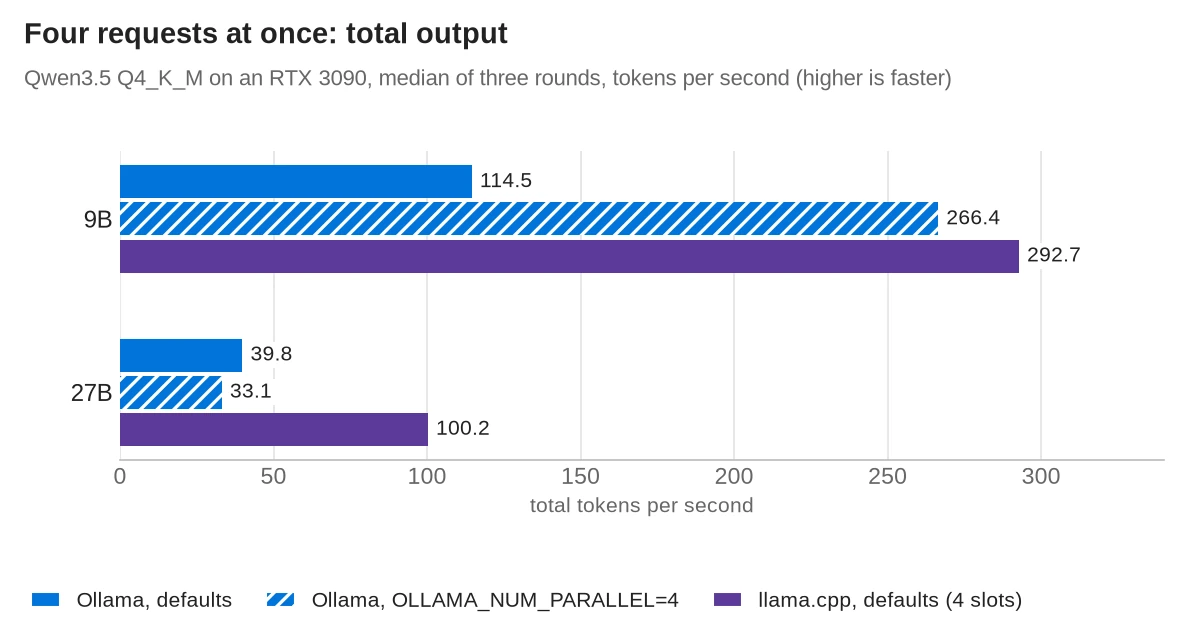
OLLAMA_NUM_PARALLEL=4 was slower than Ollama's default.In llama-server, the number of parallel slots is set with -np (--parallel); Ollama passes the value of OLLAMA_NUM_PARALLEL to it. With its defaults, Ollama queued the four requests and answered them one at a time, so the total stayed at the speed of one request. llama.cpp's four slots ran them together and produced about 2.5 times as much text per second with both models.
Setting OLLAMA_NUM_PARALLEL to 4 helped with the 9B model. Ollama then started llama-server with -np 4 and a 131,072-token context, four times 32,768, and used 9.6 GB of GPU memory. In one of the three rounds it still answered at the speed of a single request.
With the 27B model the same setting made things worse. Four full 32,768-token contexts did not fit next to the model, so Ollama placed 16 percent of the model on the CPU, as ollama ps showed, and the total fell to 33.1 tokens per second. llama.cpp kept everything on the GPU because its four slots share one 85,760-token pool instead of reserving four separate ones.
CPU only
Many home servers have no GPU. For this test both containers ran the 9B model without access to the GPU, on the Ryzen 9 5900X. Both used 12 threads, one per physical core. Each figure is the median of three runs with 128 tokens generated.
| 9B on the CPU | Ollama | llama.cpp, defaults |
|---|---|---|
| Generation, short prompt | 7.6 tok/s | 7.5 tok/s |
| Generation, long prompt | 6.7 tok/s | 6.8 tok/s |
| Reading the 4,120-token prompt | 79 tok/s | 84 tok/s |
| Wait before the first token, long prompt | 52 s | 49 s |
| Container memory | 7.0 GB (8,192-token context, long-prompt run) | 12.4 GB (262,144-token context) |
The speeds were again close. Without a GPU, Ollama started llama-server with a 4,096-token context, which its docs list for less than 24 GiB of VRAM, and the 4,120-token prompt did not fit. So the Ollama rows for the long prompt and for memory come from a second run with num_ctx set to 8,192. llama.cpp with its defaults reserved the full 262,144-token context in system RAM, which is why its container used more memory.
The prompt length mattered more than the tool: reading 4,120 tokens took about 50 seconds on twelve cores and about one second on the GPU. On a CPU-only server, keep prompts short or expect long waits before each answer, whichever tool you run.
Start-up and loading models
- llama.cpp: the server was ready 2.6 s after the container started with the 9B model and 9.7 s with the 27B model. The model files were already in the system's file cache from earlier runs.
- Ollama, later loads: loading the 9B model again took 2.7 s and the 27B model 4.3 s.
- Ollama, first load of each model: the first request after importing the 9B model took 67 s in total, and for the 27B model 88 s. About half was loading, and the rest was the first short prompt, which took more than 30 s. This did not happen again on later loads, and the logs did not show the cause.
Ollama unloads a model after five minutes without requests by default (OLLAMA_KEEP_ALIVE), so the next request waits for the model to load again. llama-server keeps its model in memory until you stop it, unless you set --sleep-idle-seconds.
Running Ollama and llama.cpp in Docker
Both run in Docker with an NVIDIA GPU once the NVIDIA Container Toolkit is installed. Bind the port to 127.0.0.1, as below, so other machines on your network can't reach it. Neither server asked for a password in this test.
Ollama, from its Docker guide, then a model downloaded from its library:
docker run -d --name ollama --gpus all -p 127.0.0.1:11434:11434 \
  -v ollama:/root/.ollama ollama/ollama:0.40.15
docker exec ollama ollama pull qwen3.5:9b
To use a GGUF file you already have, mount its folder and import it with a Modelfile that holds one line, FROM /gguf/Qwen3.5-9B-Q4_K_M.gguf. Ollama copies the file into its own store, so the model then takes its size in disk space twice.
docker exec ollama ollama create qwen35-9b -f /gguf/Modelfilellama.cpp, serving one GGUF file from ~/models:
docker run -d --name llama --gpus all -p 127.0.0.1:8080:8080 \
  -v ~/models:/models:ro ghcr.io/ggml-org/llama.cpp:server-cuda \
  -m /models/Qwen3.5-9B-Q4_K_M.gguf -c 32768
The image sets the host to 0.0.0.0 and the port to 8080 inside the container. Run outside Docker, llama-server's default port is 9931. Add -c with the context you need, or leave it out and let --fit choose. llama-server can also download a model itself with -hf and a Hugging Face repository name. It defaults to the Q4_K_M file in that repository.
On start, llama-server warned that no API key was set and that its CORS rule allowed all origins. Set --api-key if anything else on your network can reach the port. Ollama's API answered without any password in the test. Keep both ports closed on your router; the port forwarding guide explains what an open port exposes.
Day-to-day differences
| Ollama | llama.cpp (llama-server) | |
|---|---|---|
| Getting models | ollama pull by name from its library, or import a GGUF file | Point -m at a GGUF file, or download one with -hf |
| Several models | Loads models on request and unloads idle ones | One model per server, or router mode with --models-max (default 4) |
| API | Its own API on port 11434, plus OpenAI-compatible /v1 endpoints and an Anthropic-style /v1/messages | OpenAI-compatible /v1 endpoints and an Anthropic-style /v1/messages |
| Web page | None in the Docker image: the server answers API calls only | A chat page on the same port |
| Timing in responses | Durations in nanoseconds in every response | A timings object with tokens per second |
| Updates | Each release uses one fixed llama.cpp build | New builds several times a day |
The update pace matters for new models. Support for a new model type that llama.cpp adds today reaches Ollama only when an Ollama release moves to a newer llama.cpp build. Ollama 0.40.15 used build 12111, while the llama.cpp image used here was build 12199.
Which one to run on a home server
Run Ollama if you switch between models, want ollama pull and automatic unloading, or connect apps that expect Ollama's own API, such as OpenClaw. Its defaults are cautious with GPU memory, which suits a card shared with other work. Set OLLAMA_CONTEXT_LENGTH if your app sends long prompts, and test OLLAMA_NUM_PARALLEL with your model before relying on it.
Run llama.cpp if one model serves several clients at once, if you want each new llama.cpp build as soon as it is released, or if you want every flag under your control. Choose a context size and set it with -c rather than relying on the default, and add --api-key.
Neither tool will make a model faster on the same hardware. If replies are too slow, a smaller model, a lower quantization or a faster GPU will help more than switching servers. Choosing home server hardware covers the hardware side.
Frequently asked questions
What is llama.cpp?
llama.cpp is an open-source engine that runs GGUF model files on CPUs and GPUs. Its llama-server program serves a model over HTTP with an OpenAI-compatible API and a small web chat page. Ollama runs the same llama-server underneath.
Does Ollama use llama.cpp?
Yes. Since version 0.30, Ollama runs upstream llama.cpp's llama-server as a separate process for GGUF models, and each release uses one fixed llama.cpp build. Ollama 0.40.15 uses build 12111.
How much VRAM does llama.cpp need?
About the size of the GGUF file plus memory for the context. Qwen3.5 9B (a 5.7 GB file) used 6.5 GB with a 32,768-token context and 13.9 GB with llama-server's default of 262,144 tokens, which is why llama.cpp uses more memory than Ollama by default. With the same context, both used the same memory.
Can Ollama run a GGUF file from Hugging Face?
Yes. Create a Modelfile with FROM /path/to/file.gguf and run ollama create. Ollama copies the file into its own model store without changing it; in the test the stored file had the same SHA-256 checksum as the download.
Do Ollama and llama.cpp both have an OpenAI-compatible API?
Yes. Both serve OpenAI-compatible endpoints under /v1, and both also accept Anthropic-style requests at /v1/messages. Ollama also has its own API on port 11434.
Should I use Ollama or llama.cpp for several users at once?
llama.cpp handled four requests at once better in the test, at about 2.5 times Ollama's default total speed. Ollama answers one request at a time unless you set OLLAMA_NUM_PARALLEL, and with the 27B model that setting pushed part of the model onto the CPU.
Sources
- Ollama releases on GitHub
- Ollama 0.30.0 release notes
- Ollama 0.40.15 release notes
- Ollama source: llm/server.go
- Ollama 0.40.15: pinned llama.cpp build
- Ollama docs: context length
- Ollama docs: FAQ
- Ollama docs: importing a model
- Ollama docs: OpenAI compatibility
- Ollama docs: Anthropic compatibility
- Ollama docs: API
- Ollama docs: Docker
- llama.cpp: llama-server README
- llama.cpp: Docker images
- llama.cpp: CUDA Dockerfile
- llama.cpp build b12199
- llama.cpp releases on GitHub
- NVIDIA Container Toolkit install guide
- Qwen3.5-9B GGUF files (unsloth)
- Qwen3.5-27B GGUF files (unsloth)
- Atomic Chat: Ollama vs llama.cpp benchmark
- Mozilla.ai: benchmarking local LLM servers