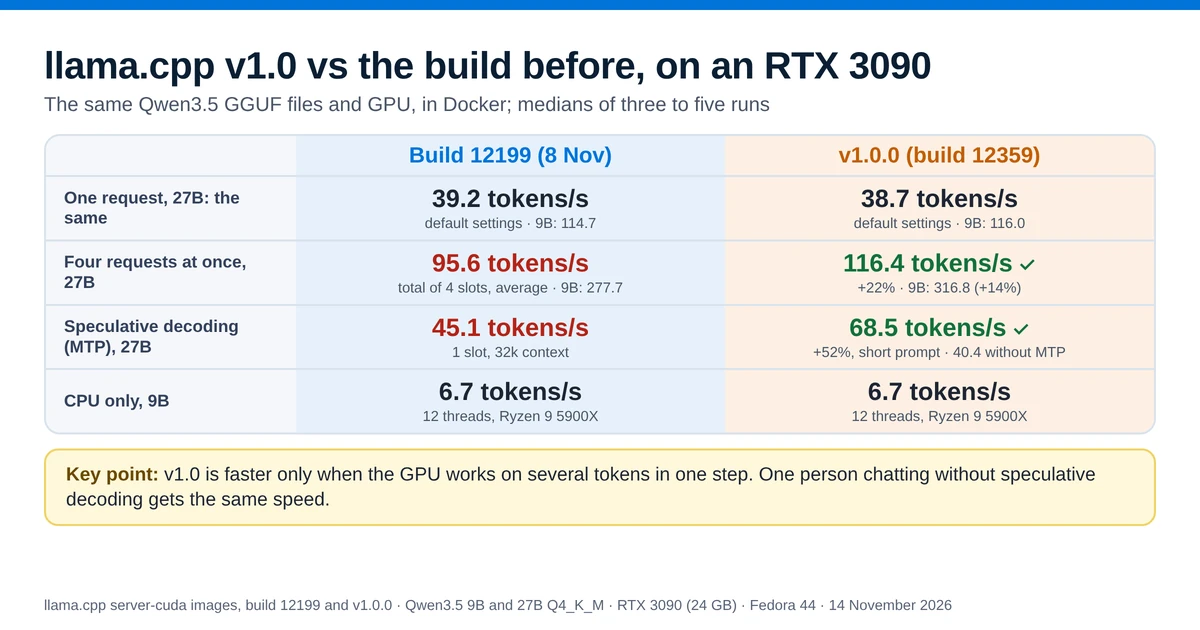
llama.cpp reached version 1.0 on 13 November 2026. This test compared it with a pre-v1 build from five days earlier (build 12199) on an RTX 3090.
- What changed: old functions and flags are removed, and there are new models, an FP8 option for the context cache, a safer
llama-serveron a network and a redesigned chat page. - What 1.0 promises: from now on, a change that could break programs built on llama.cpp's code comes with a new first number, such as 2.0.
- One request at a time: the same speed as pre-v1, without speculative decoding.
- Four requests at once: 14 to 22% more text per second.
- Speculative decoding: the 27B model wrote 52 to 55% faster.
The short answer
Speeds are in tokens per second (tok/s), and higher is faster. A token is a short piece of text, often a word or part of one. Speculative decoding and MTP are explained in their own section.
| Pre-v1 (build 12199) | v1.0.0 (build 12359) | |
|---|---|---|
| One request, 9B / 27B | 114.7 / 39.2 tok/s | 116.0 / 38.7 tok/s the same |
| Four requests at once, 9B / 27B (total) | 277.7 / 95.6 tok/s | 316.8 / 116.4 tok/s ▲ 14% / 22% |
| Speculative decoding with MTP, 27B, short prompt | 45.1 tok/s | 68.5 tok/s ▲ 52% |
| CPU only, 9B | 6.7 tok/s | 6.7 tok/s the same |
| GPU memory, 9B, defaults | 13,932 MiB | 13,932 MiB the same |
| Your start command | Works as before | --defrag-thold removed; tools on the network need an API key. Check before you update. |
Verdict: if you have an NVIDIA RTX 30-series or newer card, update if several people or programs use your server at once, or if you use speculative decoding with a larger model. If you are the only user and chat without speculative decoding, v1.0 is no faster, so update when it suits you. Either way, remove --defrag-thold from your command first.
What is llama.cpp?
llama.cpp is a free, open-source program that runs large language models on your own computer. It reads models stored as GGUF files. A GGUF file holds all of a model's weights in one file. llama.cpp runs these models on a CPU or on a GPU from NVIDIA, AMD, Intel or Apple. It is written in C and C++.
Most people use one of its programs:
llama-serverloads a model and answers requests over HTTP. It uses the same API as OpenAI, so chat apps, coding tools and agents that work with OpenAI can use it instead. It also serves a chat page in the browser.llama-clilets you chat with a model in the terminal.
Many other tools run llama.cpp underneath. Ollama starts llama.cpp's llama-server for every GGUF model it loads, and LM Studio does the same on Linux. So a change in llama.cpp reaches those tools too, once they move to a newer build.
What is ggml?
ggml is the library that does the maths inside llama.cpp: it multiplies the large tables of numbers that make up a model, on whichever CPU or GPU you have. The v1.0 announcement describes ggml as a "tensor library for machine learning" and llama.cpp as "LLM inference in C/C++". Both are made by the same team, ggml-org. Most changes to ggml are first made in the llama.cpp repository and copied to ggml afterwards, as ggml's contributing guide asks. ggml also reached v1.0.0 on 13 November.
What does llama.cpp 1.0 mean?
llama.cpp has two kinds of version number, and v1.0 did not replace either of them.
- Build numbers, such as b12199, count the changes made to the code so far. A new build is published several times a day, and that has not stopped.
- Version numbers, such as v0.9.0 and v1.0.0, give some builds a release name. They started with v0.1.2 on 18 August 2026 and reached v0.9.0 on 4 November. v1.0.0 is build 12359.
The version numbers follow semantic versioning: the first number goes up only for a change that can break software built on top of llama.cpp. The announcement puts it this way: "Moving forward, both llama.cpp and ggml will reflect API and ABI incompatibilities with major-version bumps." Its table of rules says a "breaking change to the public C API" raises the first number, the major version. A new feature, a backend update or support for a new model raises the second number, the minor version. A bug fix raises the third, the patch number.
For people who run a model at home, the version rules change little. They matter to developers whose programs build on llama.cpp's code.
What changed in v1.0 for a home server
The v1.0.0 release notes list every change since v0.9.0. The ones that matter most for a home server are:
- Faster with a few tokens at a time on NVIDIA: a new CUDA kernel handles 2 to 24 tokens at once on RTX 30-series and newer cards. A kernel is a small program that runs on the GPU. The test below measures what it changes.
- Removed flag:
--defrag-thold(-dt) is gone, along with older functions in the programming interface. Remove the flag from your start command before you update. - Tools need an API key on the network: if
llama-serverlistens on an address other than localhost and has no API key, it now refuses to turn on its built-in tools or MCP servers unless you add--allow-unauthenticated-tools. MCP servers are connections that let the model call outside programs. In this test, v1.0 in Docker would not start with--tools alland no key. It stopped with the error "server tools, MCP servers or MCP proxy are enabled on a non-loopback address without an API key". Build 12199 started with the same command, and v1.0 started once--api-keywas added. - No private addresses in requests: image and media links that point to a local or private address, such as a NAS on your network, are refused unless you add
--media-allow-private-urls. The chat page's MCP proxy can no longer reach local addresses at all. - New features: an FP8 option for the context cache (
-ctk f8_e4m3), a cache in system RAM for mixture-of-experts models, a text-to-speech endpoint at/v1/audio/speech, a redesigned chat page and support for new models, all listed in the release notes.
How the benchmark was run
Both builds ran on the same machine, with the same model files and the same prompts. The test scripts and raw results are on GitHub. Facts about llama.cpp on this page link to the page they come from, and figures without a link were measured in this test.
- Machine: Fedora 44, Docker 29.9.2, an NVIDIA RTX 3090 with 24 GB (driver 615.78.08), an AMD Ryzen 9 5900X with 12 cores, and 62 GB of RAM.
- Pre-v1: the official
ghcr.io/ggml-org/llama.cpp:server-cudaimage from 8 November, which reports0.9.0-dev (build 12199, commit 372dc5ca1). It is the build used in Ollama vs llama.cpp. - v1.0: the image
ghcr.io/ggml-org/llama.cpp:server-cuda-v1.0.0-b12359-b1b770d, which reports1.0.0-dev (build 12359, commit b1b770d90). - Models:
Qwen3.5-9B-Q4_K_M.gguf(5.7 GB) andQwen3.5-27B-Q4_K_M.gguf(16.7 GB) from the unsloth repositories on Hugging Face. Both builds used the same files. Q4_K_M is a quantization: the model's numbers are stored in about 4 bits each, so the file is smaller and fits on the GPU. The speculative decoding test used the MTP versions of the same models, described in that section. - Requests: a short prompt of about 70 tokens with 512 tokens generated, and a long prompt of about 4,120 tokens with 256 tokens generated. Thinking, the model's hidden reasoning step, was off. The temperature was 0, so the model always picked its most likely next token.
- Order and heat: the two builds took turns. Before each run, the script waited until the GPU had cooled to 50 °C, because a hot card slows down. Each figure is the median of five runs, unless the section says otherwise.
Tokens per second is how fast the model writes its answer, and higher is better. The context, mentioned below, is how many tokens the model can keep in view at once: the prompt, the conversation so far and the answer.
Speed with one request: the same as before
This is the common case at home: one person chats with the model, and the server works on one request at a time, without speculative decoding.
| Model and test | Pre-v1 (build 12199) | v1.0.0 (build 12359) | Difference |
|---|---|---|---|
| 9B, writing speed (short prompt) | 114.7 tok/s | 116.0 tok/s | +1.1% |
| 9B, writing speed (long prompt) | 111.9 tok/s | 113.5 tok/s | +1.4% |
| 9B, reading the 4,120-token prompt | 4,176 tok/s | 4,243 tok/s | +1.6% |
| 9B, wait for the first word (long prompt) | 1.08 s | 1.07 s | the same |
| 27B, writing speed (short prompt) | 39.2 tok/s | 38.7 tok/s | −1.3% |
| 27B, writing speed (long prompt) | 38.9 tok/s | 38.4 tok/s | −1.3% |
| 27B, reading the 4,120-token prompt | 1,312 tok/s | 1,303 tok/s | −0.7% |
| 27B, wait for the first word (long prompt) | 3.31 s | 3.34 s | the same |
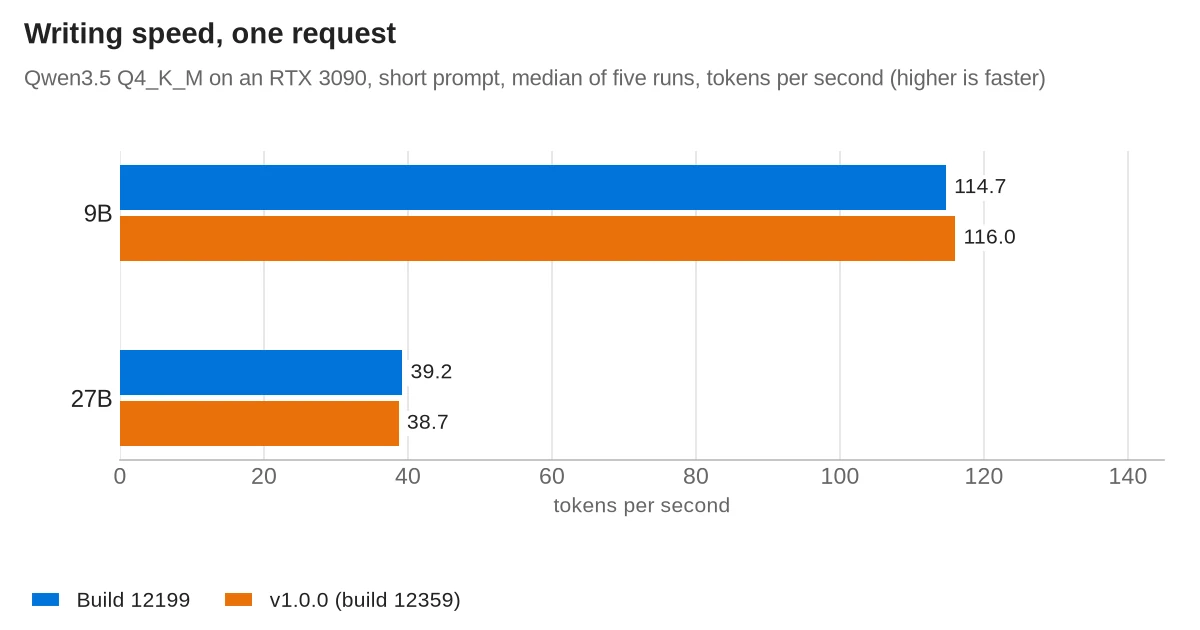
The two builds were within 2% of each other. v1.0 was slightly ahead with the 9B model and slightly behind with the 27B model. But the five runs of one build varied by more than that: v1.0's short-prompt runs on the 9B model ranged from 111.8 to 118.7 tokens per second. So the test found no real difference. An earlier run on the same day, with a slightly newer v1 build, gave the same result: every speed within about 1% of pre-v1.
Both builds were a few percent slower than in the Ollama vs llama.cpp test six days earlier, where the same pre-v1 build wrote 121.6 tokens per second with the 9B model. Pre-v1 was slower by the same amount, so the drop does not come from v1.0. Speeds on this machine changed by a few percent from one session to the next. So every comparison on this page uses runs where both builds took turns in the same session.
Parallel requests: 14 to 22% more output
A home server often has more than one client: a chat window, a coding tool and an agent can all send requests to the same model. In this test llama-server started four slots by default, so it worked on up to four requests together. The number of slots is set with -np (--parallel). Continuous batching, which runs the slots' tokens through the model together, is on by default. This test sent four requests at once, each asking for 256 tokens, and measured the total text produced per second by all four. Each build ran two separate sessions, and each figure is the median of three rounds in one session.
| Model | Pre-v1 (build 12199), total tok/s | v1.0.0 (build 12359), total tok/s | Difference |
|---|---|---|---|
| 9B | 279.2 and 276.1 (average 277.7) | 316.9 and 316.7 (average 316.8) | ▲ 14% |
| 27B | 96.0 and 95.1 (average 95.6) | 115.0 and 117.7 (average 116.4) | ▲ 22% |
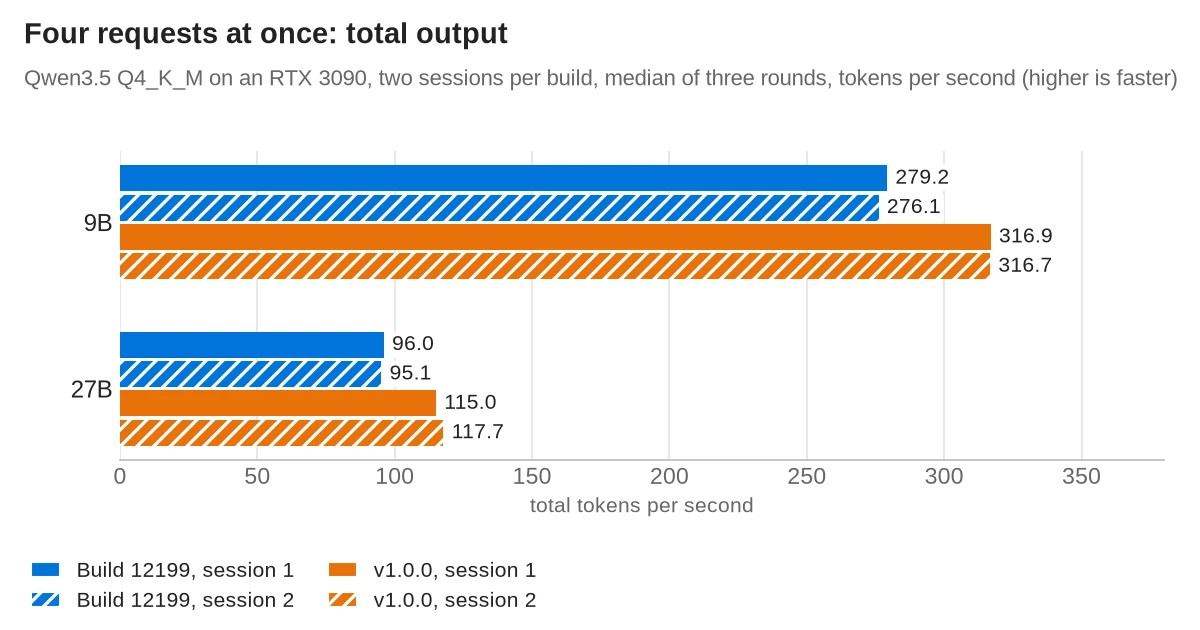
On average, v1.0 produced 14% more text per second with the 9B model and 22% more with the 27B model. Every round on v1.0 was faster than every round on pre-v1.
For each of the four requests, that is about 79 tokens per second instead of about 69 with the 9B model, and about 29 instead of about 24 with the 27B model. The earlier run with the newer v1 build gave the same gains: 15% with the 9B model and 23% with the 27B model.
Both builds used their default settings here, so the server's --fit option chose the context size to fit the free GPU memory. For the 27B model it chose between 72,960 and 79,616 tokens, shared by the four slots. The amount changed a little each time the server started. In the second session the two builds had almost the same context, 73,472 and 73,984 tokens, and v1.0 was still 24% faster.
Why: the model writes one token per request per step. With one request, each step handles one token. With four, each step handles four tokens together, one for each request. v1.0 added a new CUDA kernel for steps of 2 to 24 tokens on RTX 30-series and newer cards: it "reads each weight once" and multiplies that weight with all the tokens of the step. Steps of one token use a different kernel, which did not change. That is most likely why four requests got faster and one request did not.
The new kernel works with common quantizations such as Q4_K and Q8_0, and the Q4_K_M files in this test use them. It runs only on NVIDIA GPUs from the RTX 30 series (Ampere) onwards, so owners of older NVIDIA cards, AMD cards or Macs should not expect this gain.
Speculative decoding: 52 to 55% faster on the 27B model
Speculative decoding is a way to make one request faster. A cheaper method guesses the next few tokens. This is often a much smaller draft model. The big model then checks all the guesses in one step. Every guess the big model accepts is a token it did not have to write on its own. Because the check handles several tokens at once, it is exactly the kind of step that v1.0's new kernel speeds up. The pull request that added the kernel names speculative decoding as its main reason and reports 34.9% more speed on an RTX 3090 Ti, with a different model and draft model.
The guesses came from MTP (multi-token prediction): extra layers, trained with the model, that predict the tokens after the next one. unsloth publishes Qwen3.5 GGUF files that include these layers. The files are 5.87 GB for the 9B model and 17.11 GB for the 27B model. llama.cpp's speculative decoding guide lists the option as draft-mtp, "Multi Token Prediction (MTP) heads from the main model". Both builds ran the same MTP files with a 32,768-token context and one slot, once with speculative decoding and once without. The command with it was:
llama-server -m Qwen3.5-27B-MTP-Q4_K_M.gguf -c 32768 -np 1 \
  --spec-type draft-mtp --spec-draft-n-max 6
--spec-draft-n-max 6 lets MTP guess up to six tokens ahead, the value unsloth's model card suggests. The same card says MTP does not yet work with more than one slot. These runs used different files and settings from the one-request test, and they ran later in the evening. So their speeds without speculative decoding are not the same as in that table. Compare the rows of this table only with each other.
| Model, prompt and setting | Pre-v1 (build 12199) | v1.0.0 (build 12359) |
|---|---|---|
| 27B, short prompt, without speculative decoding | 40.6 tok/s | 40.4 tok/s the same |
| 27B, short prompt, with MTP | 45.1 tok/s | 68.5 tok/s ▲ 52% |
| 27B, long prompt, without speculative decoding | 39.8 tok/s | 40.2 tok/s the same |
| 27B, long prompt, with MTP | 46.5 tok/s | 71.9 tok/s ▲ 55% |
| 9B, short prompt, without speculative decoding | 121.8 tok/s | 122.1 tok/s the same |
| 9B, short prompt, with MTP | 96.5 tok/s | 122.3 tok/s ▲ 27% |
| 9B, long prompt, without speculative decoding | 119.0 tok/s | 119.4 tok/s the same |
| 9B, long prompt, with MTP | 108.1 tok/s | 146.8 tok/s ▲ 36% |
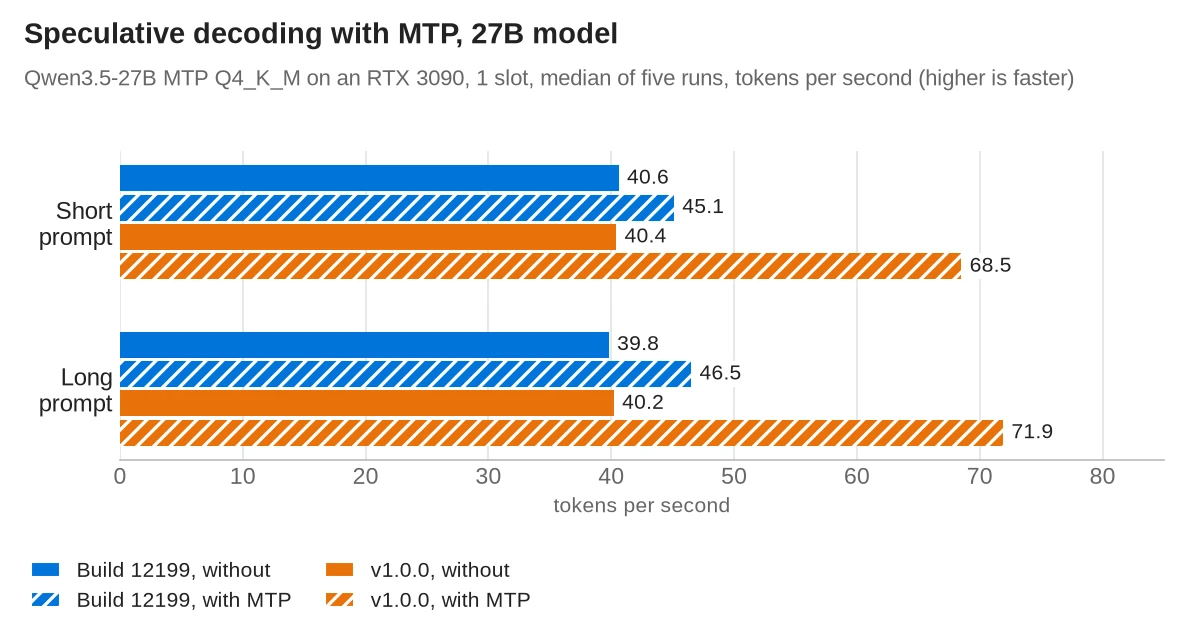
Key point: with speculative decoding, v1.0 wrote 68.5 tokens per second with the 27B model, against 45.1 on pre-v1: 52% faster. Without speculative decoding the two builds were the same.
- 27B model: on pre-v1, MTP added 11% with the short prompt and 17% with the long one. On v1.0 it added 70% and 79%. None of the five v1.0 runs was slower than the fastest run on pre-v1.
- 9B model: on pre-v1, MTP made the model slower: 21% with the short prompt and 9% with the long one. On v1.0 it made no difference with the short prompt and added 23% with the long one.
- The guesses were equally good on both builds: the model accepted about 32 to 33% of the guessed tokens with the 27B model and 27 to 28% with the 9B model. So the gain comes from checking the guesses faster, not from better guesses.
- Memory: MTP used more GPU memory, about 1,490 MiB more with the 27B model (19,538 against 18,048 MiB on v1.0) and 700 to 730 MiB more with the 9B model.
A separate small model can also make the guesses. In a single trial run on v1.0 with Qwen3.5 0.8B as the guesser, the 27B model got slower instead: 30.7 tokens per second against about 40 without it. Fewer than half of the 0.8B model's guesses were accepted. Speculative decoding only makes the model faster when the guesses are often right, so test it with your own model and prompts before you rely on it.
CPU only: unchanged
Many home servers have no GPU, and v1.0's speed change is for NVIDIA GPUs only. For this test both builds ran the 9B model without access to the GPU, on the Ryzen 9 5900X with 12 threads, which is the default. They took turns, and each figure is the median of three runs with 128 tokens generated.
| 9B on the CPU | Pre-v1 (build 12199) | v1.0.0 (build 12359) |
|---|---|---|
| Writing speed, short prompt | 6.7 tok/s | 6.7 tok/s the same |
| Writing speed, long prompt | 6.0 tok/s | 6.1 tok/s the same |
| Reading the 4,120-token prompt | 78 tok/s | 79 tok/s the same |
| Wait for the first word, long prompt | 53.0 s | 52.2 s the same |
The two builds were the same on the CPU. Reading a long prompt takes about 50 seconds without a GPU on either build, so on a CPU-only server short prompts matter more than the version.
GPU memory: unchanged
Both builds used the same GPU memory with the same settings. With default settings the 9B model took 13,932 MiB on both, much more than its 5.7 GB file, because by default llama-server reserves memory for the model's full 262,144-token context. With the 27B model, --fit sized the context to the free memory at each start, and both builds used between about 20,970 and 21,390 MiB. If a model fit on your card before the update, it still fits.
How to update llama.cpp to v1.0
First check your llama.cpp version. Every llama.cpp program prints it with --version:
llama-server --versionIn this test, v1.0 printed version: 1.0.0-dev (build 12359, commit b1b770d90) and the older build version: 0.9.0-dev (build 12199, commit 372dc5ca1). Both Docker images print -dev, even the v1.0.0 one. A build number of 12359 or higher includes everything in v1.0.
How you update depends on how you installed it:
- Docker: download the image again and recreate the container. The images are rebuilt once a day from the newest build, so the
server-cudatag points to a newer build every day. On 14 November it was build 12375, which is v1.0 plus 16 later changes.docker pull ghcr.io/ggml-org/llama.cpp:server-cuda docker rm -f llama docker run -d --name llama --gpus all -p 127.0.0.1:8080:8080 \ -v ~/models:/models:ro ghcr.io/ggml-org/llama.cpp:server-cuda \ -m /models/Qwen3.5-9B-Q4_K_M.gguf -c 32768 - Homebrew (macOS and Linux):
brew upgrade llama.cpp, Homebrew's upgrade command. The Homebrew formula builds the v1.0.0 release. - Winget (Windows):
winget upgrade llama.cpp, winget's upgrade command. Winget gets the daily builds, not the numbered releases, so you get the newest build. - Prebuilt files: the files for v1.0.0 are on the release page of build 12359, for example
llama-b12359-bin-ubuntu-cuda-12.8-x64.tar.gzfor Linux with an NVIDIA GPU.
Tip: to stay on one build, use a fixed image tag instead of server-cuda. server-cuda-v1.0.0-b12359-b1b770d is v1.0.0, and server-cuda-b12375 is build 12375. The package page lists every tag. Then a new image arrives only when you change the tag.
Before you restart, remove --defrag-thold from your command, and add an API key with --api-key if you use tools or MCP servers on a port other machines can reach.
Do Ollama and LM Studio use llama.cpp v1.0 yet?
- Ollama: not yet. Each Ollama release is built with one fixed llama.cpp build, written in its
LLAMA_CPP_VERSIONfile. Ollama 0.40.16, the newest release on 14 November, uses build 12177, and the 0.40.17 pre-release uses build 12257. Both are older than v1.0's build 12359. - LM Studio: unknown. LM Studio's changelog gives the llama.cpp engine its own version numbers, such as 2.67.0, and does not say which llama.cpp build the engine is based on.
So the faster handling of several requests at once reaches Ollama only when an Ollama release moves to build 12359 or newer.
Should you update?
Update if you serve several requests at once or use speculative decoding, on an NVIDIA RTX 30-series card or newer. Those are the cases where v1.0 was faster in this test, by 14 to 22% with four requests and by 52 to 55% with speculative decoding on the 27B model. With the 9B model, speculative decoding only made the model faster with the long prompt.
If you are the only user and chat without speculative decoding, or you run on a CPU, an AMD card or a Mac, this test found no speed change. You can update when it suits you.
Whichever case you are in, check your start command first: remove --defrag-thold, and add --api-key if you use tools or MCP servers on an address other machines can reach. If you run Ollama, you get none of this until Ollama moves to a newer llama.cpp build.
Frequently asked questions
What is llama.cpp?
llama.cpp is a free, open-source program that runs large language models from GGUF files on CPUs and GPUs. Its llama-server program serves a model over HTTP with an OpenAI-compatible API and a chat page. Ollama and LM Studio run llama.cpp underneath.
What does llama.cpp 1.0 mean?
It is the first major version under semantic versioning, released on 13 November 2026 as build 12359. It removes old functions and flags, adds new models and makes llama-server safer on a network. From now on, a breaking change to llama.cpp's C programming interface raises the first number.
Is llama.cpp v1.0 faster?
Not for a single request without speculative decoding: on an RTX 3090 it was within 2% of an earlier build. With four requests at once it produced 14 to 22% more text per second, and with speculative decoding the 27B model wrote 52 to 55% faster. The gain needs an NVIDIA RTX 30-series card or newer.
How do I update llama.cpp?
In Docker, pull ghcr.io/ggml-org/llama.cpp:server-cuda again and recreate the container. With Homebrew, run brew upgrade llama.cpp, and with winget, winget upgrade llama.cpp. Remove --defrag-thold from your command first, because v1.0 removed it.
How do I check which llama.cpp version I have?
Run llama-server --version. v1.0 prints 1.0.0-dev (build 12359, commit b1b770d90), and any build number of 12359 or higher includes v1.0.
Does Ollama use llama.cpp v1.0?
Not yet. Ollama 0.40.16 uses llama.cpp build 12177 and the 0.40.17 pre-release uses build 12257, both older than v1.0's build 12359.
Sources
- llama.cpp v1.0.0 release notes
- ggml v1.0.0 release notes
- Hugging Face blog: llama.cpp v1.0.0
- ggml discussion: versioning
- llama.cpp v0.1.2 release
- llama.cpp v0.9.0 release
- llama.cpp build b12359 (v1.0.0 files)
- llama.cpp build b12199
- llama.cpp releases on GitHub
- llama.cpp PR 31533: CUDA kernel for 2 to 24 tokens
- llama.cpp PR 30565: removed functions and flags
- llama.cpp PR 32113: tools need opt-in on the network
- llama.cpp PR 32115: private addresses refused
- llama.cpp: llama-server README
- llama.cpp: Docker images
- llama.cpp: Docker build workflow
- llama.cpp container images and tags
- llama.cpp: install guide
- ggml: contributing guide
- Homebrew formula for llama.cpp
- Ollama 0.40.16: pinned llama.cpp build
- Ollama PR 19646: llama.cpp build 12257
- LM Studio changelog
- Qwen3.5-9B GGUF files (unsloth)
- Qwen3.5-27B GGUF files (unsloth)
- Qwen3.5-9B MTP GGUF files (unsloth)
- Qwen3.5-27B MTP GGUF files (unsloth)
- Qwen3.5-0.8B GGUF files (unsloth)
- llama.cpp: speculative decoding guide
- Homebrew manual
- winget upgrade command