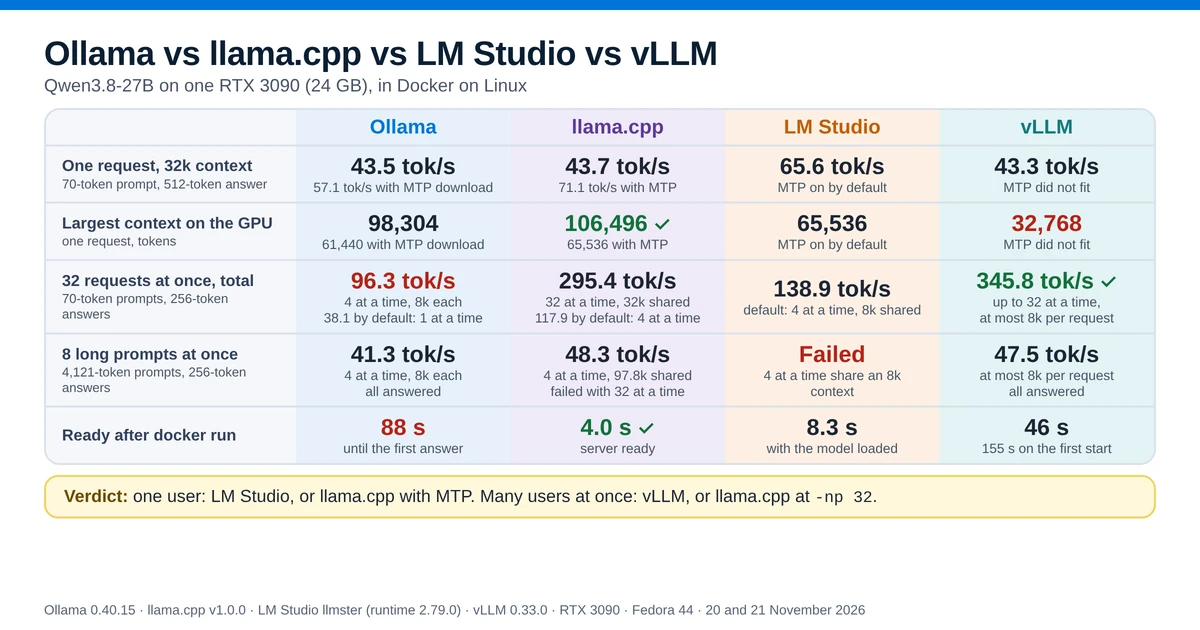
This test ran Ollama, llama.cpp, LM Studio and vLLM one after another on the same RTX 3090, with Qwen3.8-27B in each, and sent each the same requests: one at a time, then up to 32 at once.
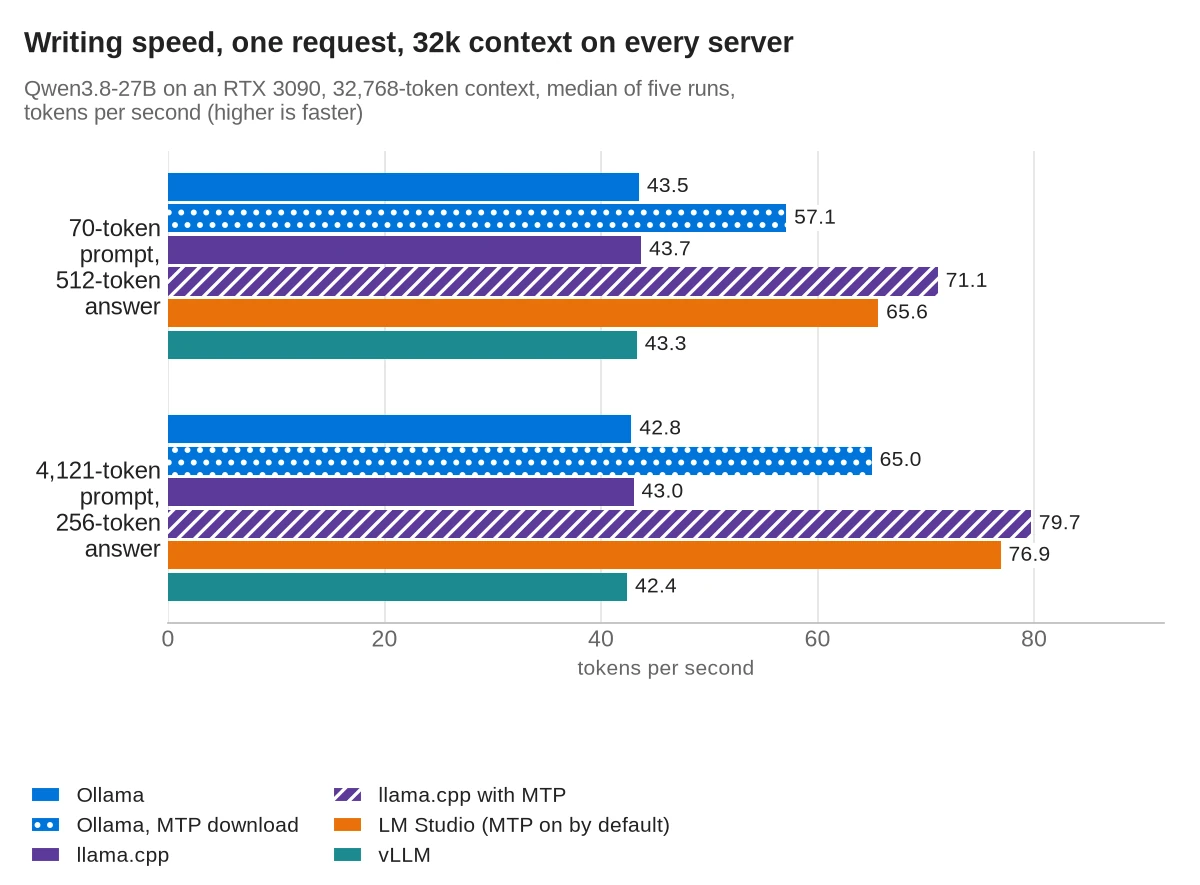
- One request at a time: with a 70-token prompt and without speculative decoding, Ollama, llama.cpp and vLLM wrote 43.3 to 43.7 tokens per second with the same 32k context. The context size did not change the speed: llama.cpp wrote 43.7 at 32k, 96k and 106,496 tokens.
- Speculative decoding with MTP: LM Studio turned it on by itself and wrote 65.8 tokens per second with its default 8k context. llama.cpp v1.0 with LM Studio's settings and MTP wrote 70.9, also at 8k, and Ollama with its separate MTP download 57.1 at 32k.
- 32 requests at once: with 70-token prompts and 256-token answers, vLLM produced the most, 345.8 tokens per second in total, working on up to 32 at a time with at most 8k of context per request. llama.cpp working on 32 at a time with a shared 32k context produced 295.4, LM Studio working on 4 at a time with a shared 8k context 138.9, and Ollama at most 96.3, working on 4 at a time with 8k each.
- 24 GB is the limit: the largest context that fit was 106,496 tokens on llama.cpp, 65,536 with MTP, and 32,768 on vLLM. Three setups whose shared context was smaller than eight long prompts need failed when those prompts arrived together.
- Start-up: llama.cpp was ready in 4 s and LM Studio in about 8 s. vLLM took 46 s, and Ollama answered its first request after 88 s.
The four servers in short
Three of the four run the same engine. llama.cpp is a C/C++ program, and its llama-server has an OpenAI-compatible API. Since version 0.30, Ollama runs llama.cpp's server underneath, and the Ollama log in this test showed it starting llama-server with the model file. LM Studio downloads llama.cpp as a separate runtime; the CUDA runtime used here, version 2.79.0, is llama.cpp build 12521. All three read GGUF files, so this test loaded one GGUF file into all three.
vLLM is a separate engine, built to serve one model to many users at once. It loads models in the Hugging Face format, so for 4-bit weights it needs an AWQ or GPTQ upload instead of a GGUF file.
| Ollama | llama.cpp | LM Studio | vLLM | |
|---|---|---|---|---|
| Engine | llama.cpp | llama.cpp | llama.cpp | its own |
| Model file in this test | GGUF (imported) | GGUF | GGUF (linked) | AWQ 4-bit |
| Version tested | 0.40.15 | v1.0.0 (build 12359) | llmster, runtime 2.79.0 | 0.33.0 |
| License | MIT | MIT | Proprietary, free for personal and internal business use | Apache 2.0 |
The licenses are from Ollama's, llama.cpp's and vLLM's license files and from LM Studio's app terms. Earlier tests on this site compared the servers in pairs with Qwen3.5: Ollama vs llama.cpp, LM Studio vs Ollama, vLLM vs Ollama and vLLM vs llama.cpp.
The short answer
Speeds are in tokens per second (tok/s), and higher is faster. Each cell gives the server's defaults first, then the best setting tested where it differs.
| Ollama | llama.cpp | LM Studio | vLLM | Best | |
|---|---|---|---|---|---|
| Speed, one request (70-token prompt, 512-token answer) | 43.5 tok/s with a 32k context 57.1 tok/s with the MTP download and a 32k context | 43.8 tok/s with a 97.8k context 70.9 tok/s with MTP and an 8k context | 65.8 tok/s with MTP (on by default) and an 8k context | 43.5 tok/s with an 8k context; MTP did not fit | llama.cpp with MTP, then LM Studio |
| First word (70-token prompt) | 0.39 s | 0.27 s | 0.27 s | 0.12 s | vLLM |
| Total output, 32 requests at once (70-token prompts, 256-token answers) | 38.1 tok/s with 1 request at a time and a 32k context 96.3 tok/s with 4 requests at a time and an 8k context each | 117.9 tok/s with 4 requests at a time sharing a 97.8k context 295.4 tok/s with 32 requests at a time sharing a 32k context ( -np 32) | 138.9 tok/s with 4 requests at a time sharing an 8k context | 345.8 tok/s with up to 32 requests at a time and at most 8k of context per request | vLLM; llama.cpp with -np 32 15% behind |
| Eight long prompts at once (4,121-token prompts, 256-token answers) | All answered with 1 request at a time and a 32k context, and with 4 requests at a time and an 8k context each | All answered with 4 requests at a time sharing a 97.8k context Failed with 32 requests at a time sharing a 32k context ( -np 32) | Failed with 4 requests at a time sharing an 8k context | All answered with up to 32 requests at a time and at most 8k of context per request | Ollama, llama.cpp defaults, vLLM |
| GPU memory | 17.0 GiB with a 32k context | 21.5 GiB with a 97.8k context | 18.2 GiB with an 8k context | 22.0 GiB with an 8k context | Ollama |
Ready after docker run | 88 s to the first answer | 4.0 s | 8.3 s | 46 s; 155 s on the first start | llama.cpp |
Verdict: for one person chatting with Qwen3.8-27B, run LM Studio, or llama.cpp with MTP turned on: on the short prompt both wrote 50 to 63% faster at an 8k context than Ollama with its defaults or vLLM, and 15 to 24% faster than Ollama's MTP download. For many requests at once, run vLLM, or llama.cpp with -np 32, which came within 15% of it at 32 requests and starts in seconds.
How to read the table: Ollama, llama.cpp and LM Studio loaded the same GGUF file, so their numbers compare the servers alone. vLLM loaded a different file with the same model in 4 bits (AWQ), so its numbers compare vLLM with an AWQ file against the others with a GGUF file. "With MTP" means speculative decoding with the prediction layer that is built into Qwen3.8. "4 at a time" means the server works on 4 requests together, and a fifth request waits until one of them finishes. "Shared" means all the requests in progress draw from one context of that size, so one request can use all of it, but the requests together can't use more. "Per request" or "each" means every request has its own limit of that size, however many are running. In the results tables, green and red arrows compare a row with the same server's defaults row, or in the MTP table with the row that has the same settings without MTP: green is better, red is worse. LM Studio turns it on by default. llama.cpp ran it only when it was turned on, Ollama only with its separate MTP download, which uses Ollama's own GGUF file, and vLLM ran without it.
Why Qwen3.8-27B, and how big is it?
The earlier comparisons on this site used Qwen3.5 9B, a model that leaves plenty of a 24 GB card free. Qwen3.8-27B is a larger and newer model, and it fills most of the card, so it shows where each server runs out of memory. Its model card lists 27B parameters and a native context of 262,144 tokens. It mixes two kinds of layers: of every four, three are Gated DeltaNet layers and one is a Gated Attention layer. Gated DeltaNet is a form of linear attention. It was also trained with multi-token prediction (MTP), and it reads images and video as well as text. The license is Apache 2.0.
In 4 bits, the files used here were:
- GGUF:
Qwen3.8-27B-UD-Q4_K_M.gguffrom unsloth, 16.6 GB, for Ollama, llama.cpp and LM Studio. - AWQ:
cyankiwi/Qwen3.8-27B-AWQ-INT4, 21.0 GB on disk, for vLLM. vLLM reported 18.28 GiB of weights in GPU memory after loading it.
On the GPU, the servers used 16.0 to 22.0 GiB with the model loaded, depending on how much context they kept (see GPU memory). The 4-bit model runs on a 24 GB card, but a long context or many requests at once take most of what is left.
How the test was run
- Machine: Fedora 44, Docker 29.9.2, an NVIDIA RTX 3090 with 24 GB (driver 615.78.08), an AMD Ryzen 9 5900X and 62 GB of RAM. The desktop held about 1.2 GiB of the GPU's memory. GPU memory on this page is in GiB, as
nvidia-smireports it. - Servers: each ran in Docker from its official image:
ollama/ollama:0.40.15,ghcr.io/ggml-org/llama.cpp:server-cuda-v1.0.0-b12359-b1b770d,lmstudio/llmster-preview:cpuwith LM Studio's CUDA 12 runtime 2.79.0, andvllm/vllm-openai:v0.33.0. - Same file: Ollama imported the GGUF with a one-line Modelfile (
FROMthe file), and LM Studio linked it withlms import. Ollama's copy had the same SHA-256 as the original file. The one exception is Ollama's MTP download,qwen3.8:27b-mtp-q4_K_M, which comes with Ollama's own 16.8 GB Q4_K_M file. - Settings: each server ran with its defaults, plus the settings named on each row. vLLM ran with
--max-model-len 8192 --gpu-memory-utilization 0.93 --max-num-seqs 32 --max-cudagraph-capture-size 32 --language-model-only, because 32k did not fit when the test started; the section on GPU memory explains why. - Requests: a short prompt of 70 tokens and a long prompt of 4,121 tokens; the servers counted 70 to 73 and 4,120 to 4,122 tokens, depending on their chat template. One request at a time generated 512 tokens on the short prompt and 256 on the long one. With several requests, each generated 256 tokens. Every prompt started with a random ID, so no server could reuse a cached prompt. Thinking was off and the temperature was 0.
- Method: one Python client sent the requests and timed them, through each server's own API for Ollama and LM Studio and through
/v1/chat/completionsfor llama.cpp and vLLM. The servers ran one at a time on 20 November, and the runs at 32k, 96k and the largest context on 20 and 21 November, with no other server container running. Before each round, the client waited until the GPU had cooled to 50 °C. Single-request results are the median of five rounds, and results with several requests are the median of three.
Answer quality was not compared. The test scripts and raw results are on GitHub. Facts about the tools come from the pages listed under Sources, and every other figure was measured in this test.
One request at a time: the context size did not change the speed, MTP did
The context is the most tokens one request can hold, prompt and answer together. The first table runs each server with its defaults, so the contexts differ. The next three set every server to the same context: 32k, 96k, and the largest that fit with the whole model on the GPU. Each server kept its default number of requests at a time, and only one request was sent.
Each server's defaults
| Setup | Context | Speed, 70-token prompt, 512-token answer | Speed, 4,121-token prompt, 256-token answer | First word, 70-token prompt | First word, 4,121-token prompt | GPU memory |
|---|---|---|---|---|---|---|
| Ollama | 32,768 | 43.5 tok/s | 42.8 tok/s | 0.39 s | 3.26 s | 17.0 GiB |
| Ollama, MTP download | 32,768 | 57.1 tok/s (▲ 31%) | 65.0 tok/s (▲ 52%) | 0.43 s (▲ 10%) | 3.63 s (▲ 11%) | 19.5 GiB |
| llama.cpp | 97,792 | 43.8 tok/s | 43.0 tok/s | 0.27 s | 3.02 s | 21.5 GiB |
| LM Studio (MTP on) | 8,192 | 65.8 tok/s | 76.6 tok/s | 0.27 s | 3.79 s | 18.2 GiB |
| vLLM (context set in this test) | 8,192 | 43.5 tok/s | 42.7 tok/s | 0.12 s | 3.35 s | 22.0 GiB |
32k context (32,768 tokens) on every server
| Setup | Speed, 70-token prompt, 512-token answer | Speed, 4,121-token prompt, 256-token answer | First word, 70-token prompt | First word, 4,121-token prompt | GPU memory |
|---|---|---|---|---|---|
| Ollama (its default) | 43.5 tok/s | 42.8 tok/s | 0.39 s | 3.26 s | 17.0 GiB |
| Ollama, MTP download (its default) | 57.1 tok/s (▲ 31%) | 65.0 tok/s (▲ 52%) | 0.43 s (▲ 10%) | 3.63 s (▲ 11%) | 19.5 GiB |
| llama.cpp | 43.7 tok/s | 43.0 tok/s | 0.24 s | 2.99 s | 17.5 GiB |
| llama.cpp with MTP | 71.1 tok/s (▲ 63%) | 79.7 tok/s (▲ 85%) | 0.25 s (▲ 4%) | 3.09 s (▲ 3%) | 19.9 GiB |
| LM Studio (MTP on) | 65.6 tok/s | 76.9 tok/s | 0.27 s | 3.77 s | 19.9 GiB |
| vLLM | 43.3 tok/s | 42.4 tok/s | 0.11 s | 3.36 s | 22.0 GiB |
96k context (98,304 tokens) on every server
| Setup | Speed, 70-token prompt, 512-token answer | Speed, 4,121-token prompt, 256-token answer | First word, 70-token prompt | First word, 4,121-token prompt | GPU memory |
|---|---|---|---|---|---|
| Ollama | 43.4 tok/s | 42.7 tok/s | 0.37 s | 3.23 s | 21.1 GiB |
| Ollama, MTP download | Did not fit: Ollama moved 19% of the model to the CPU | ||||
| llama.cpp | 43.7 tok/s | 42.9 tok/s | 0.24 s | 2.99 s | 21.5 GiB |
| llama.cpp with MTP | Did not fit | ||||
| LM Studio (MTP on) | Did not fit | ||||
| vLLM | Did not fit: it needed 6.32 GiB for this context and had 0.97 GiB | ||||
The largest context that fit on the GPU
| Setup | Largest context | Speed, 70-token prompt, 512-token answer | Speed, 4,121-token prompt, 256-token answer | First word, 70-token prompt | First word, 4,121-token prompt | GPU memory |
|---|---|---|---|---|---|---|
| Ollama | 98,304 | 43.4 tok/s | 42.7 tok/s | 0.37 s | 3.24 s | 21.1 GiB |
| Ollama, MTP download | 61,440 | 57.6 tok/s | 64.4 tok/s | 0.41 s | 3.60 s | 21.4 GiB |
| llama.cpp | 106,496 | 43.7 tok/s | 42.9 tok/s | 0.25 s | 3.00 s | 22.1 GiB |
| llama.cpp with MTP | 65,536 | 70.3 tok/s | 80.6 tok/s | 0.25 s | 3.10 s | 22.0 GiB |
| LM Studio (MTP on) | 65,536 | 65.3 tok/s | 76.0 tok/s | 0.27 s | 3.78 s | 22.0 GiB |
| vLLM | 32,768 | 43.3 tok/s | 42.4 tok/s | 0.11 s | 3.36 s | 22.0 GiB |
The largest context was searched in steps of 4,096 tokens, and a setup counted only when the whole model stayed on the GPU. The desktop held 0.9 to 1.4 GiB of the card during these runs, so on a card without a desktop each server would fit somewhat more.
Without MTP, the context size made no difference to writing speed. llama.cpp wrote 43.7 tokens per second on the short prompt at 32k, 96k and 106,496 tokens, and Ollama 43.4 to 43.5 at 32k and 96k. A larger context only took more GPU memory: llama.cpp held 17.5 GiB at 32k and 22.1 GiB at 106,496 tokens.
MTP was the one setting that changed the speed, and it costs context. llama.cpp with MTP wrote 63% faster than without it at the same 32k, but its largest context fell from 106,496 to 65,536 tokens. LM Studio, which turns MTP on by default, also stopped at 65,536.
The wait for the first word was close. On the short prompt, vLLM started its answer after 0.11 to 0.12 s, and Ollama after 0.37 to 0.43 s. On the long prompt, all four needed about 3 to 4 s to read the 4,121 tokens before the first word.
Speculative decoding with MTP: why LM Studio is the fastest out of the box
Speculative decoding lets the model guess several tokens ahead and then check the guesses in one step. Qwen3.8 has a small prediction layer for this built in, called MTP. The llama.cpp v1.0 test explains how it works and measured it on Qwen3.5-27B.
Why: LM Studio turned MTP on without being asked. Its llama-server ran with --spec-type draft-mtp --spec-draft-n-max 3, and its log showed 44 to 47% of the guessed tokens accepted. MTP explains most of the gap between LM Studio's 65.8 tokens per second at 8k and the 43.8 of llama.cpp with its defaults at 97.8k; the table below compares the two at the same 8k.
To check this, llama.cpp v1.0 ran with LM Studio's exact settings (8k context, 4 requests at a time, --kv-unified, the same batch sizes), once with MTP and once without:
| Setup (all: 8,192 tokens of context shared, 4 at a time) | One request, 70-token prompt, 512-token answer | One request, 4,121-token prompt, 256-token answer | 4 requests at once, total, 70-token prompts, 256-token answers | 32 requests at once, total, same prompts |
|---|---|---|---|---|
| llama.cpp, LM Studio's settings, no MTP | 43.7 tok/s | 43.0 tok/s | 122.5 tok/s | 118.2 tok/s |
| llama.cpp, LM Studio's settings, MTP | 70.9 tok/s (▲ 62%) | 78.1 tok/s (▲ 82%) | 164.7 tok/s (▲ 34%) | 160.1 tok/s (▲ 35%) |
| LM Studio, defaults | 65.8 tok/s | 76.6 tok/s | 143.2 tok/s | 138.9 tok/s |
The results:
- MTP helped most with one request: llama.cpp wrote 62% faster on the short prompt and 82% faster on the long one, probably because the long prompt asks for a summary, which repeats words from that prompt.
- It helped less with many requests: 34 to 35% more total output at 4 and 32 requests, because the GPU is already busy with several requests at once.
- llama.cpp v1.0 was slightly ahead of LM Studio: 8% on the short prompt and 2% on the long one, even though LM Studio ran the same flags on a newer llama.cpp build (12521 against 12359).
The other two servers:
- vLLM: its MTP setting is
--speculative-config '{"method":"mtp","num_speculative_tokens":3}', and the AWQ file includes the MTP layer. vLLM ran out of GPU memory while building the MTP layer: it tried to take another 2.37 GiB with about 0.8 GiB free, in both tries. On a 24 GB card, vLLM ran this model without MTP. - Ollama: the GGUF imported with a Modelfile ran without MTP. Ollama's library has a separate
qwen3.8:27b-mtp-q4_K_Mdownload, and with it Ollama 0.40.15 started itsllama-serverwith--spec-type draft-mtp --spec-draft-n-max 4and 1 request at a time. It wrote 57.1 tokens per second on the short prompt and 65.0 on the long one, 31% and 52% faster than the imported file without MTP. Its log counted 41% of the guessed tokens accepted over the whole run. This download uses Ollama's own 16.8 GB Q4_K_M file, not the unsloth file, so the gap is not from MTP alone, and this test did not find out why it stayed behind llama.cpp and LM Studio with MTP.
llama.cpp v1.0 with MTP had one problem. After the 32-request test, the next request stopped the server with failed to remove sequence 0. It happened again when the test was repeated. LM Studio's newer build did not fail in the same test.
Many requests at once: vLLM produced the most, llama.cpp running 32 at a time close behind
A home server often has more than one client: a chat window, an agent and a script, all sending requests to one model. In this test, 4 to 32 requests, each with a 70-token prompt and a 256-token answer, started at the same moment, and the table shows the total output per second until the last one finished.
| Setup | Context | 4 at once | 8 at once | 16 at once | 32 at once |
|---|---|---|---|---|---|
| Ollama, defaults (1 at a time) | 32,768 | 41.0 tok/s | 40.6 tok/s | 39.7 tok/s | 38.1 tok/s |
| Ollama, MTP download (1 at a time) | 32,768 | 53.2 tok/s (▲ 30%) | 51.9 tok/s (▲ 28%) | 51.3 tok/s (▲ 29%) | 49.3 tok/s (▲ 29%) |
Ollama, 4 at a time (OLLAMA_NUM_PARALLEL=4) | 4 × 8,192 | 100.6 tok/s (▲ 145%) | 100.3 tok/s (▲ 147%) | 98.4 tok/s (▲ 148%) | 96.3 tok/s (▲ 153%) |
| llama.cpp, defaults (4 at a time) | 97,792 shared | 122.1 tok/s | 121.4 tok/s | 119.8 tok/s | 117.9 tok/s |
llama.cpp, 32 at a time (-np 32) | 32,768 shared | 121.4 tok/s (▼ 1%) | 194.8 tok/s (▲ 60%) | 264.2 tok/s (▲ 121%) | 295.4 tok/s (▲ 151%) |
| llama.cpp with MTP (4 at a time) | 8,192 shared | 164.7 tok/s (▲ 35%) | 164.4 tok/s (▲ 35%) | 162.2 tok/s (▲ 35%) | 160.1 tok/s (▲ 36%) |
| LM Studio, defaults (4 at a time, MTP) | 8,192 shared | 143.2 tok/s | 143.0 tok/s | 142.5 tok/s | 138.9 tok/s |
| vLLM, 32 at a time | 8,192 per request | 150.6 tok/s | 287.9 tok/s | 282.8 tok/s | 345.8 tok/s |
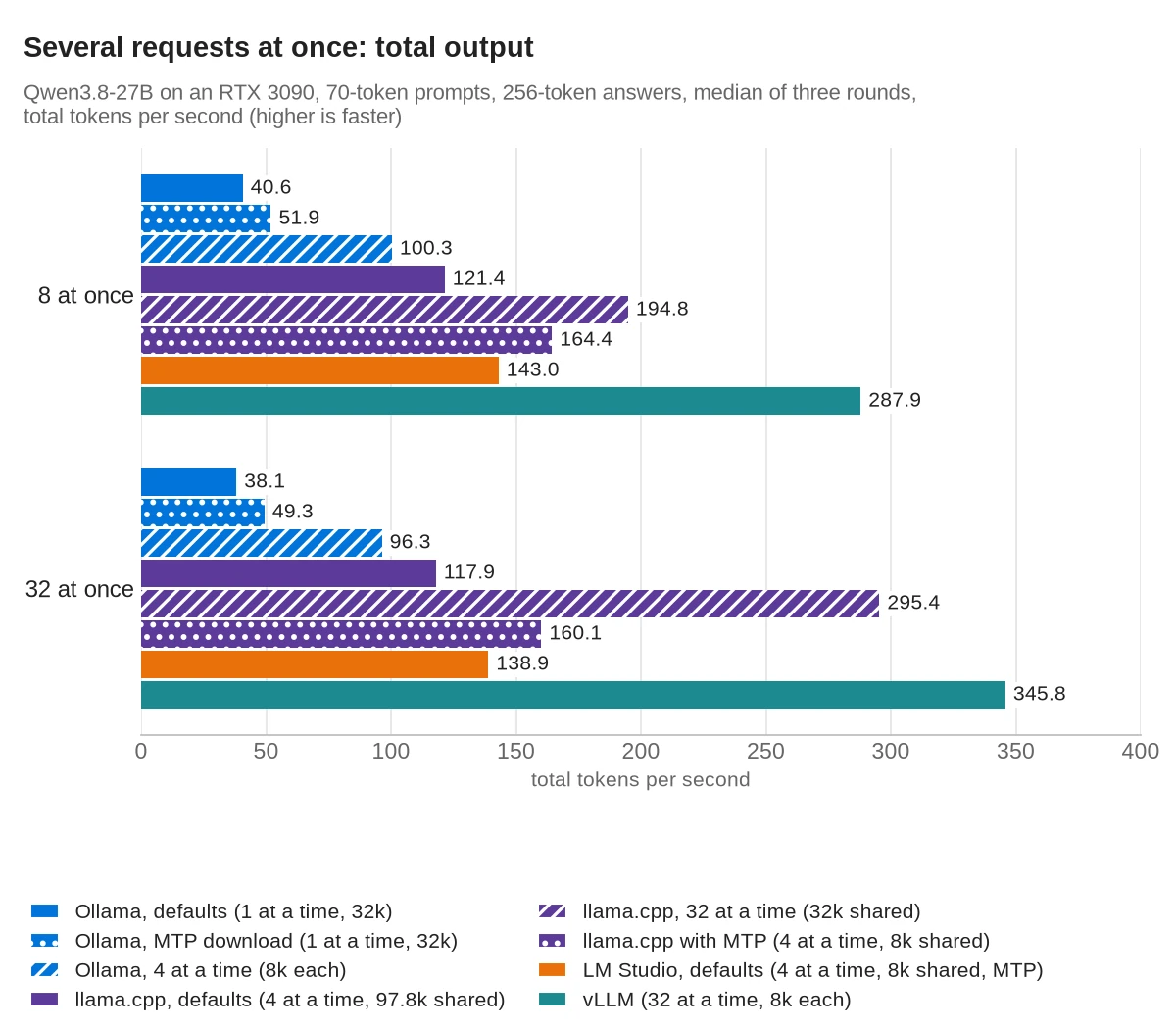
A server's total grows only while it can add requests to the batch. Ollama with its defaults runs one request at a time, so its total stayed near its single-request speed; with the MTP download, it stayed at 49.3 to 53.2 tokens per second. Ollama set to 4 at a time, and llama.cpp and LM Studio with their default of 4 at a time, all stopped growing at four requests, and the other requests waited in a queue. With four requests, Ollama's default of 1 at a time made the last one wait 19.1 s for its first word.
vLLM and llama.cpp with -np 32 could run all 32 together. At 32 requests, vLLM produced 17% more than llama.cpp. Once a request had started writing, it wrote 33.2 tokens per second on vLLM and 12.1 on llama.cpp; the total is lower than 32 times that, because requests started at different times. vLLM's total did not grow from 8 to 16 requests. In the 16-request test, the median request waited 0.9 s for its first word and the longest 8.7 s, so vLLM probably held some requests back until others finished.
Setting -np is the change that matters on llama.cpp: -np 32 raised its total at 32 requests from 117.9 to 295.4 tokens per second. On Ollama, OLLAMA_NUM_PARALLEL does the same job.
Waiting for the first word
Total output shows how much work gets done. The wait shows how the server feels to the person behind the last request in the queue.
| Setup, 32 requests at once (70-token prompts, 256-token answers) | Context | Median wait | Longest wait |
|---|---|---|---|
| Ollama, defaults (1 at a time) | 32,768 | 100.6 s | 209.0 s |
| Ollama, MTP download (1 at a time) | 32,768 | 79.4 s (▼ 21%) | 162.2 s (▼ 22%) |
| Ollama, 4 at a time | 4 × 8,192 | 37.6 s (▼ 63%) | 75.9 s (▼ 64%) |
| llama.cpp, defaults (4 at a time) | 97,792 shared | 30.8 s | 61.6 s |
llama.cpp, 32 at a time (-np 32) | 32,768 shared | 6.6 s (▼ 79%) | 6.9 s (▼ 89%) |
| llama.cpp with MTP (4 at a time) | 8,192 shared | 19.8 s (▼ 36%) | 45.8 s (▼ 26%) |
| LM Studio, defaults (4 at a time, MTP) | 8,192 shared | 26.4 s | 53.5 s |
| vLLM, 32 at a time | 8,192 per request | 9.3 s | 17.4 s |
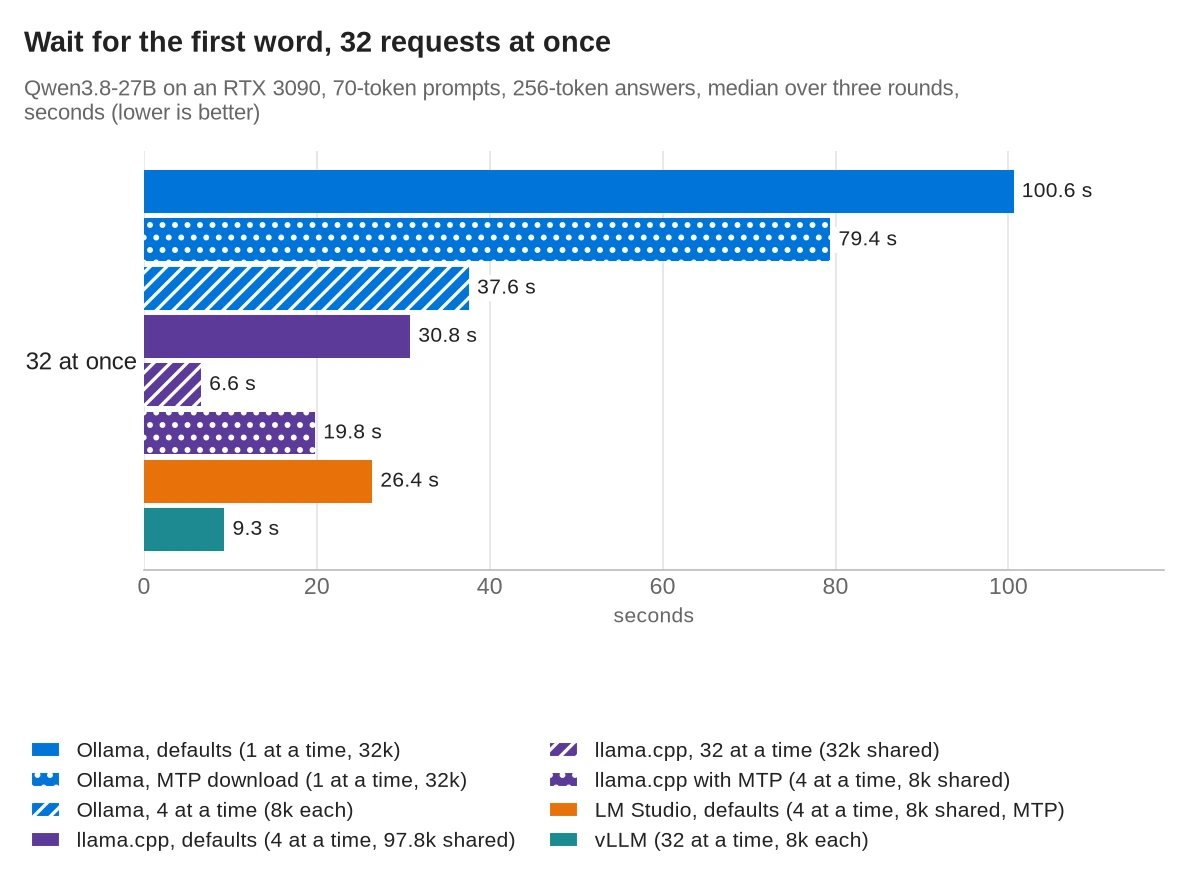
llama.cpp running 32 at a time had the shortest waits: every request started within 6.9 s. vLLM's median was 9.3 s and its longest 17.4 s. Working on 1 at a time, Ollama made the last of 32 requests wait 209.0 s.
Eight long prompts at once: three setups failed
Eight requests with the 4,120-token prompt and a 256-token answer need about 35,000 tokens of context in total. This test shows how each server handles more context than it has.
| Setup | Context | Result | Total output, 8 × 4,121-token prompts, 256-token answers |
|---|---|---|---|
| Ollama, defaults | 32,768, one request at a time | All answered | 26.6 tok/s |
| Ollama, MTP download | 32,768, one request at a time | All answered | 31.6 tok/s (▲ 19%) |
| Ollama, 4 at a time | 4 × 8,192 | All answered | 41.3 tok/s (▲ 55%) |
| llama.cpp, defaults | 97,792 shared, 4 at a time | All answered | 48.3 tok/s |
llama.cpp, 32 at a time (-np 32) | 32,768 shared | Failed | none |
| llama.cpp, LM Studio's settings | 8,192 shared, 4 at a time | Failed | none |
| LM Studio, defaults | 8,192 shared, 4 at a time | Failed | none |
| vLLM | 8,192 per request, 30,840 in total | All answered | 47.5 tok/s |
Key point: a server that shares one context between all the requests it works on at a time fails when the requests together need more than that context. llama.cpp answered "Context size has been exceeded", and no request in the batch got an answer, in any of the three rounds. Ollama and vLLM queued the extra requests instead.
LM Studio's default 8,192-token context holds one long prompt, so one long request at a time worked. With --kv-unified, size llama.cpp's -c for the requests you expect together: eight of these requests need about 35,000 tokens, more than the 32,768-token context that fit on this card with 32 at a time.
GPU memory: what fits in 24 GB
| Setup | Context | GPU memory |
|---|---|---|
| Ollama, defaults | 32,768, 1 at a time | 17.0 GiB |
| Ollama, MTP download | 32,768, 1 at a time | 19.5 GiB |
| Ollama, 4 at a time | 4 × 8,192 | 17.5 GiB |
| llama.cpp, defaults | 97,792 shared, 4 at a time | 21.5 GiB |
llama.cpp, 32 at a time (-np 32) | 32,768 shared | 21.7 GiB |
| llama.cpp, LM Studio's settings, no MTP | 8,192 shared, 4 at a time | 16.0 GiB |
| llama.cpp, LM Studio's settings, MTP | 8,192 shared, 4 at a time | 18.2 GiB |
| LM Studio, defaults (MTP) | 8,192 shared, 4 at a time | 18.2 GiB |
| vLLM | 8,192 per request, 0.93 memory limit | 22.0 GiB |
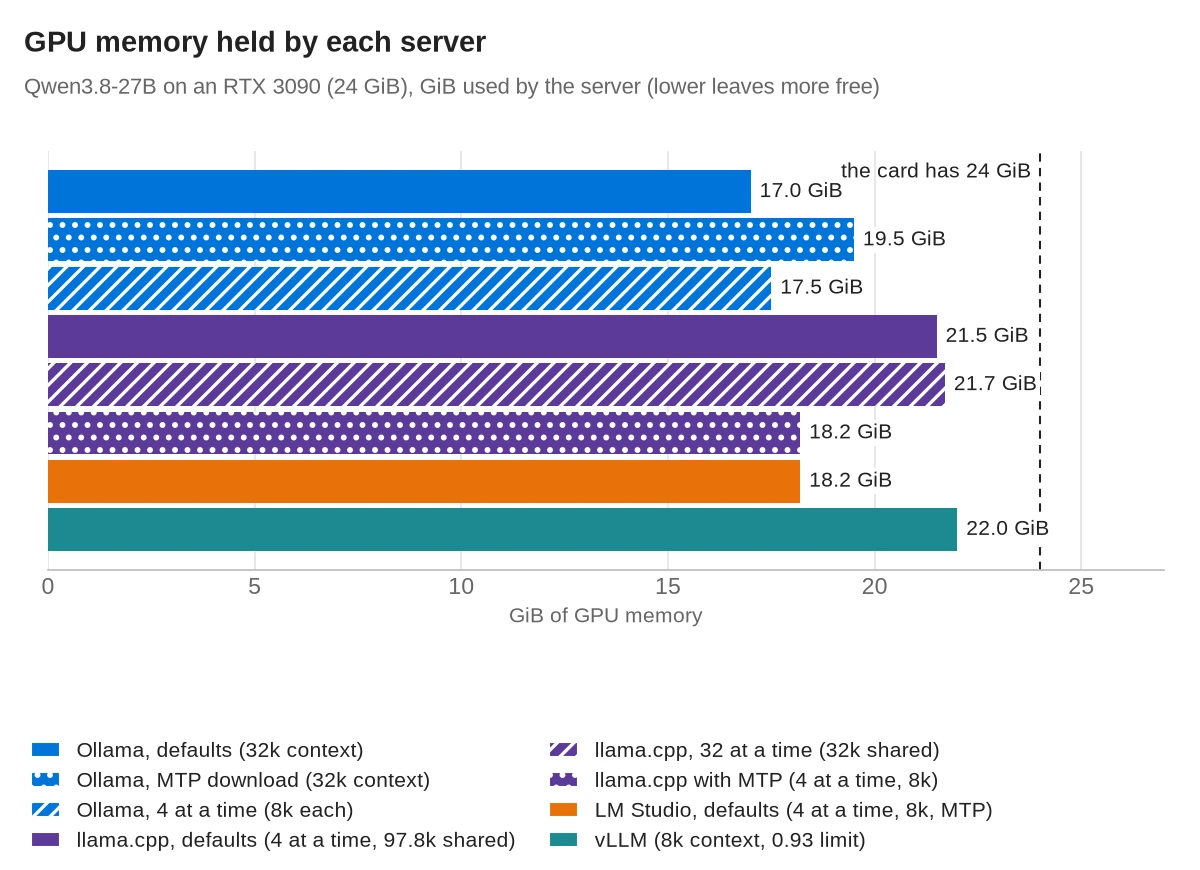
Each server sizes its context differently:
- Ollama picks the default context from the card's memory: 32k on cards with 24 to 48 GiB, and 4k below 24 GiB.
- llama.cpp fits the context to the free memory when you don't set it. Here it chose 97,792 tokens and 4 requests at a time.
- LM Studio loads with an 8,192-token context and 4 requests at a time unless you change them.
- vLLM reserves a share of the card first and fills what the model doesn't need with cache.
vLLM had the least room, and its room changed between starts. With 18.28 GiB of weights, --max-model-len 32768 and --gpu-memory-utilization 0.93, the most this card allowed with the desktop running, it first had 1.03 GiB of cache and said the longest possible request was 11,760 tokens. The main runs therefore used --max-model-len 8192, which still fits the long prompt. In the later context runs, the same 32,768 setting started in three tries out of three, with 43,690 to 44,373 tokens of cache, and 36,864 did not fit. This test did not find out why the first start had less room.
The number of requests vLLM runs at once has a second limit on this model. Each running request needs one block for the linear-attention layers, and on its first start, with an empty compile cache, vLLM refused --max-num-seqs 32: "max_num_seqs (32) exceeds available Mamba cache blocks (21)". It started with 16. With the compile cache in place, the same command with 32 worked.
Tip: when you set llama.cpp's -c yourself, check that the whole model stayed on the GPU. With -np 32 -c 49152, llama.cpp v1.0 started without an error, but it had moved layers to the CPU, and it wrote 11.5 tokens per second instead of 43.7. Adding -ngl all --fit off keeps every layer on the GPU, and then the server fails to load if the context doesn't fit.
Start-up time: llama.cpp in 4 s, Ollama's first answer after 88 s
| Server | Time after docker run |
|---|---|
| llama.cpp, defaults | 4.0 s until ready |
| LM Studio | 3.9 s until the server answered, then 4.4 s to load the model |
| vLLM, compile cache on disk | 46.4 s until ready |
| vLLM, first start | 155.1 s until ready |
| Ollama, defaults | 5.5 s until the API answered, 88.4 s until the first answer |
| Ollama, MTP download | 5.2 s until the API answered, 60.5 s until the first answer |
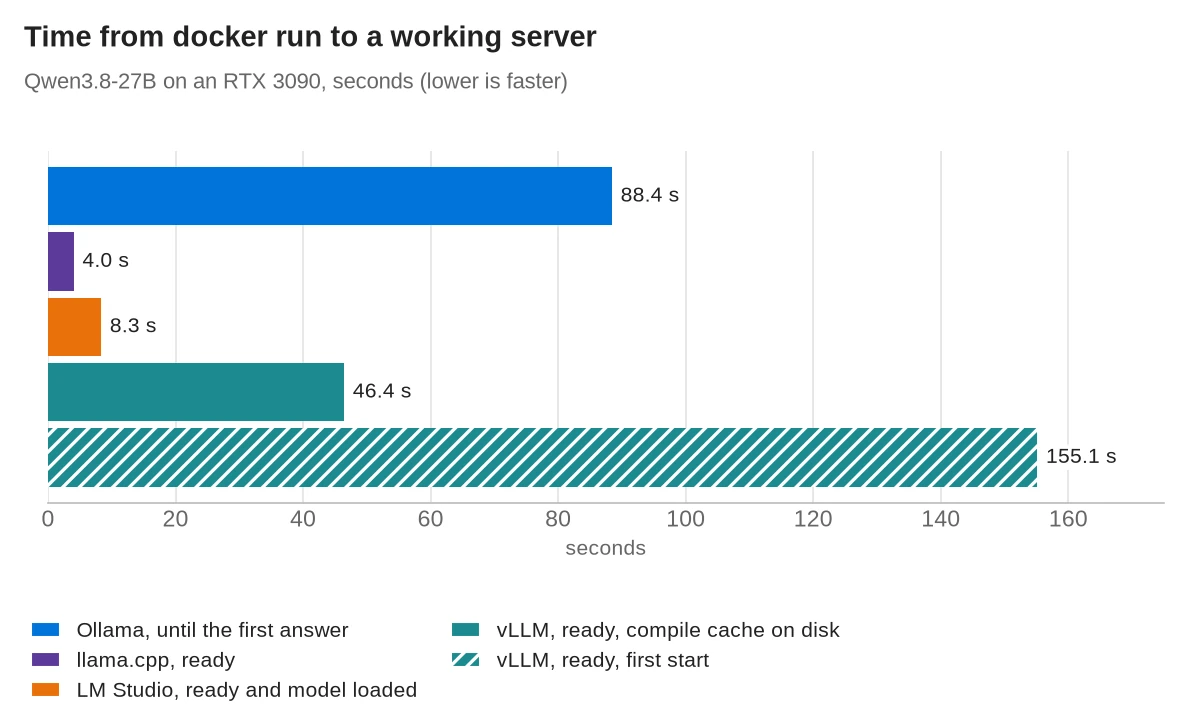
docker run until each server could answer. Ollama loads the model on the first request, so its bar runs to the first answer.Ollama's API answered after 5.5 s, but Ollama loads a model only when the first request arrives. That first answer came 88.4 s after docker run. Ollama counted 32.1 s of it as loading the model, and its log did not break down the rest. Set to 4 at a time, Ollama gave its first answer after 85.7 s, and with the MTP download 60.5 s, of which Ollama counted 31.5 s as loading. Later requests did not wait, because the model stayed loaded. vLLM compiles the model on its first start and keeps the result in a cache folder, so mount that folder to keep later starts near 46 s.
Which one to run on a home server
- One person chatting: LM Studio, because MTP is on by default and it wrote 65.8 tokens per second without any settings. llama.cpp is as fast or faster with
--spec-type draft-mtp, but v1.0 crashed with MTP after a burst of 32 requests in this test. - A few clients at once: llama.cpp or LM Studio, which work on 4 requests at a time by default, or Ollama with
OLLAMA_NUM_PARALLEL=4. Ollama's default of 1 at a time made the last of four requests wait 19.1 s. - Many requests at once: vLLM for the highest total, or llama.cpp with
-np 32, which came within 15% and started every request sooner. Give either one a context that fits all the requests you expect. - Long prompts from several clients: Ollama or vLLM, which queued requests that didn't fit, or llama.cpp with a
-clarge enough for all of them. - The fewest settings: Ollama. It picked a 32k context for this card and kept the whole model on the GPU, at 43.5 tokens per second. Its
qwen3.8:27b-mtp-q4_K_Mdownload turns on MTP and wrote 57.1.
Commands used in this test
All four run in Docker with an NVIDIA GPU once the NVIDIA Container Toolkit is installed. The ports are bound to 127.0.0.1, so other machines on your network can't reach them. The GGUF file is in ~/models.
llama.cpp v1.0 with MTP, using LM Studio's settings:
docker run -d --name llama --gpus all -p 127.0.0.1:8080:8080 \
  -v ~/models:/models:ro ghcr.io/ggml-org/llama.cpp:server-cuda-v1.0.0-b12359-b1b770d \
  -m /models/Qwen3.8-27B-UD-Q4_K_M.gguf --host 0.0.0.0 --port 8080 \
  -c 8192 -np 4 --kv-unified -b 2048 -ub 512 -ngl all --fit off \
  --spec-type draft-mtp --spec-draft-n-max 3
For many requests at once, replace the last two lines with -np 32 -c 32768 --kv-unified -ngl all --fit off, the setting that produced 295.4 tokens per second at 32 requests.
Ollama set to 4 requests at a time, then the model imported from the same GGUF file:
echo "FROM /gguf/Qwen3.8-27B-UD-Q4_K_M.gguf" > Modelfile
docker run -d --name ollama --gpus all -p 127.0.0.1:11434:11434 \
  -e OLLAMA_NUM_PARALLEL=4 -e OLLAMA_CONTEXT_LENGTH=8192 \
  -v ollama:/root/.ollama -v ~/models:/gguf:ro -v $PWD/Modelfile:/Modelfile:ro \
  ollama/ollama:0.40.15
docker exec ollama ollama create qwen38-27b -f /Modelfile
Ollama with MTP, using its own download instead of the imported file:
docker exec ollama ollama pull qwen3.8:27b-mtp-q4_K_MvLLM with the settings that fit on a 24 GB card. Use --max-num-seqs 16 on the first start, before the compile cache exists:
docker run -d --name vllm --gpus all --ipc=host -p 127.0.0.1:8000:8000 \
  -v ~/.cache/huggingface:/root/.cache/huggingface -v ~/vllm-cache:/root/.cache/vllm \
  vllm/vllm-openai:v0.33.0 --model cyankiwi/Qwen3.8-27B-AWQ-INT4 --language-model-only \
  --max-model-len 8192 --gpu-memory-utilization 0.93 \
  --max-num-seqs 32 --max-cudagraph-capture-size 32
--language-model-only skips the model's image and video part, which this test did not use. LM Studio's headless setup is in the LM Studio vs Ollama comparison; here, lms import linked the same GGUF file and lms load loaded it with its defaults.
Qwen3.8 thinks before it answers unless you turn it off. This test sent "chat_template_kwargs": {"enable_thinking": false} to llama.cpp and vLLM, "think": false to Ollama and "reasoning": "off" to LM Studio.
Frequently asked questions
Which is fastest: Ollama, llama.cpp, LM Studio or vLLM?
For one request with a 70-token prompt, Qwen3.8-27B on an RTX 3090, llama.cpp with MTP turned on wrote 70.9 tokens per second and LM Studio, which turns MTP on by default, 65.8, both with an 8k context. Ollama with its MTP download wrote 57.1 at 32k. Without MTP, Ollama, llama.cpp and vLLM wrote 43.5 to 43.8. With 32 requests at once, vLLM produced the most, 345.8 tokens per second in total, with at most 8k of context per request.
Can Qwen3.8-27B run on an RTX 3090?
Yes. The 4-bit GGUF file is 16.6 GB, and the servers in this test used 16.0 to 22.0 GiB of the card's 24 GB. Without MTP it wrote about 43.5 tokens per second for one request with a 70-token prompt.
How much VRAM does Qwen3.8-27B need?
In 4 bits, the servers used 16.0 GiB with an 8k context and 21.5 GiB with llama.cpp's default 97,792-token context. MTP added about 2.3 GiB. The largest context that fit was 106,496 tokens on llama.cpp, 65,536 with MTP, and 32,768 on vLLM, which loaded 18.28 GiB of weights.
Does LM Studio use speculative decoding by default?
In this test, yes. LM Studio's llama-server ran Qwen3.8-27B with --spec-type draft-mtp --spec-draft-n-max 3 without being asked, and it wrote 65.8 tokens per second at an 8k context, against 43.8 for llama.cpp without MTP at its default 97.8k.
Does vLLM support MTP on a 24 GB card?
vLLM has an MTP setting, but with Qwen3.8-27B in 4 bits on an RTX 3090 it ran out of GPU memory while building the MTP layer. It needed another 2.37 GiB with about 0.8 GiB free.
Do Ollama and LM Studio use llama.cpp?
Yes. Ollama runs llama.cpp's server underneath, and LM Studio's CUDA runtime 2.79.0 is llama.cpp build 12521. vLLM is a separate engine.
Sources
- Qwen3.8-27B model card (Qwen, Hugging Face)
- Qwen3.8-27B GGUF files (unsloth)
- Qwen3.8-27B AWQ INT4 (cyankiwi)
- Ollama 0.30.0 release notes
- Ollama docs: context length
- Ollama library: qwen3.8 tags
- Ollama license
- llama.cpp: llama-server README at v1.0.0
- llama.cpp license
- LM Studio docs: speculative decoding
- LM Studio app terms
- vLLM docs: MTP (multi-token prediction)
- vLLM license
- NVIDIA Container Toolkit install guide