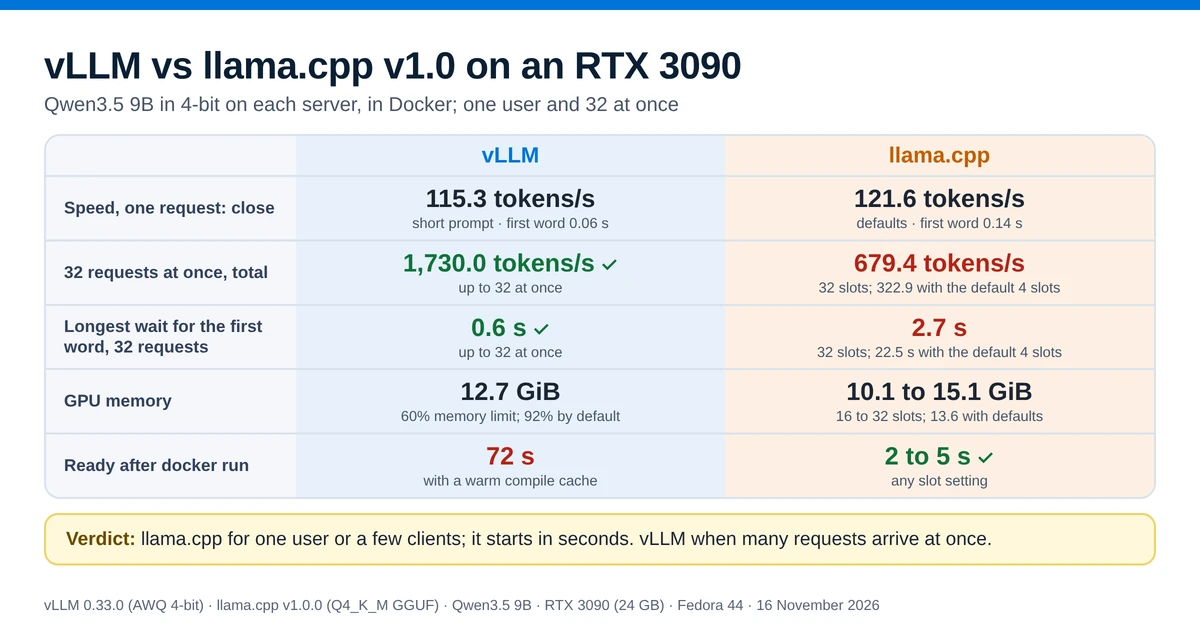
This test ran vLLM and llama.cpp v1.0 on one RTX 3090 with Qwen3.5 9B, sending 1 to 32 requests at once.
- One request at a time: close. llama.cpp wrote 121.6 tokens per second and vLLM 115.3, 5% apart.
- 32 requests at once: vLLM produced 1,730.0 tokens per second in total, 2.5× llama.cpp with 32 slots, and started every answer within 0.6 s.
- llama.cpp's defaults: only four requests run together, so the last of 32 waited 22.5 s. Setting
-np(short for--parallel, the number of requests llama.cpp works on at once, called slots) fixes most of that. - Start-up: llama.cpp was ready in 2 to 5 s, vLLM in 72 s.
vLLM and llama.cpp in short
llama.cpp is a C/C++ library for running language models, and llama-server is its HTTP server with an OpenAI-compatible API. It reads GGUF files and runs on NVIDIA, AMD and Intel GPUs, Apple silicon, Vulkan and plain CPUs. Ollama is built on it: since version 0.30, Ollama runs llama.cpp's server underneath, which the Ollama vs llama.cpp comparison measured on this same machine.
vLLM is an inference server built to serve one model to many users at once. Its README names its two main techniques: PagedAttention, which stores each request's working memory in small blocks, and continuous batching, which adds new requests to the batch the GPU is already working on. It loads models in the Hugging Face format, and for 4-bit weights it uses formats such as AWQ and GPTQ.
llama-server can also work on several requests at once. Its README lists "parallel decoding with multi-user support" and continuous batching, which is on by default, and the -np option sets how many requests it works on together. This test measured llama.cpp with its defaults and with 16 and 32 slots.
The short answer
Speeds are in tokens per second (tok/s), and higher is faster. Both servers got the same prompts and wrote the same number of tokens per request (see how the test was run). The marker shows which tool came out ahead.
| vLLM | llama.cpp | |
|---|---|---|
| Speed, one request (short prompt) | 115.3 tok/s; first word after 0.06 s | 121.6 tok/s with its defaults; first word after 0.14 s ▲ 5% |
| Total output, 32 requests at once | 1,730.0 tok/s ▲ 2.5× | 679.4 tok/s with -np 32, 322.9 with its default 4 slots |
| Longest wait for the first word, 32 requests | 0.6 s ▲ 2.1 s sooner | 2.7 s with -np 32, 22.5 s with its default 4 slots |
| GPU memory | 12.7 GiB with a 60% limit; reserves 92% of the card by default | 10.1 to 15.1 GiB, depending on -np and -c similar |
Ready after docker run | 72 s with its compile cache in place | 2 to 5 s ▲ about a minute sooner |
Verdict: for most home servers, run llama.cpp: one user or a few clients get answers at least as fast as from vLLM, and it starts in seconds. Run vLLM when many requests really do arrive together, and set -np on llama.cpp if several clients overlap.
Is vLLM faster than llama.cpp?
It depends on how many requests arrive at once. For one request at a time, no: llama.cpp generated text a little faster in every single-request test here. vLLM was faster from four requests up, and the gap grew with every step. At 32 requests at once, vLLM's total output was 2.5 times that of the best llama.cpp setting, and each request in the batch still ran at 61.1 tokens per second, against 26.7 on llama.cpp.
The figures are for a 9B model in 4-bit on one consumer card. Red Hat's tests on a data-center H200 found a larger gap at 64 users, with vLLM's output about 44 times llama.cpp's. Their earlier article lists the llama.cpp options it set: threads and GPU layers, not the number of slots.
How the test was run
- Machine: Fedora 44, Docker 29.9.2, an NVIDIA RTX 3090 with 24 GB (driver 615.78.08), an AMD Ryzen 9 5900X and 62 GB of RAM. The desktop used about 2.5 GiB of the GPU's memory during the test. GPU memory on this page is in GiB, as
nvidia-smiand vLLM report it. - Servers: vLLM 0.33.0 from the
vllm/vllm-openai:v0.33.0image, and llama.cpp v1.0.0 (build 12359, released on 13 November 2026) from theghcr.io/ggml-org/llama.cpp:server-cuda-v1.0.0-b12359-b1b770dimage. The llama.cpp v1.0 article measures what changed from the build before it. - Models: Qwen3.5 9B in each server's usual 4-bit format. llama.cpp loaded
Qwen3.5-9B-Q4_K_M.gguf(5.7 GB). vLLM loadedcyankiwi/Qwen3.5-9B-AWQ-4bit(9.1 GB). They are different files, so this compares two ways of running the same model at 4 bits. Answer quality was not compared. - vLLM settings:
--max-model-len 32768 --gpu-memory-utilization 0.6 --max-num-seqs 32. The default memory setting would not start with the desktop's memory in use; the section on memory explains why. - Requests: a short prompt of about 70 tokens and a long prompt of about 4,120 tokens. One request at a time generated 512 tokens on the short prompt and 256 on the long one (256 on the short prompt for the
-np 16run). With several requests, each generated 256 tokens. Both servers got the same prompts and the same output limit (max_tokens), and every answer on both ran to that limit, so both wrote exactly the same number of tokens per request. The servers counted 64 to 75 prompt tokens for the short prompt and 4,116 to 4,125 for the long one, on both tools; the small spread comes from the random ID. Every prompt started with a random ID, so neither server could reuse a cached prompt. Thinking was off and the temperature was 0. - Method: the same Python client sent the same requests to both servers'
/v1/chat/completionsendpoint and timed them on the client side. Both servers ran one after the other in one session on 16 November, with every other container on the machine stopped; a log taken after each test shows nothing else on the GPU. Before each round, the client waited until the GPU had cooled to 50 °C. Single-request results are the median of five rounds, and results with several requests are the median of three.
The test scripts and raw results are on GitHub. Facts about the tools link to the page they come from. Figures without a link were measured in this test.
One request at a time: close, with llama.cpp slightly ahead
| Measure | vLLM | llama.cpp defaults | llama.cpp -np 32 |
|---|---|---|---|
| Generation, short prompt (tok/s) | 115.3 | 121.6 ▲ 5% | 121.3 ▲ 5% |
| Generation, long prompt (tok/s) | 112.5 | 119.1 ▲ 6% | 119.3 ▲ 6% |
| First word, short prompt | 0.06 s ▲ 0.08 s sooner | 0.14 s | 0.14 s |
| First word, long prompt (4,120 tokens) | 1.00 s ▲ 0.04 s sooner | 1.04 s | 1.05 s |
For one person chatting with a model, the two servers were close. llama.cpp generated 5 to 6% more tokens per second, with either slot setting. vLLM started its answer slightly sooner, but on a short prompt both started within 0.14 s.
Many requests at once: vLLM produced 2.5 times as much at 32
A home server often has more than one client: a chat window, an agent and a script, all sending requests to one model. In this test, 4 to 32 requests started at the same moment, and the table shows the total output per second until the last one finished. The marker compares vLLM with the best llama.cpp setting in the same row.
| Requests at once | vLLM | llama.cpp defaults (4 slots) | llama.cpp -np 16 | llama.cpp -np 32 |
|---|---|---|---|---|
| 1 | 113.9 | 117.7 close | 117.3 | 117.8 |
| 4 | 397.6 ▲ 1.2× | 332.1 | 332.6 | 330.3 |
| 8 | 771.1 ▲ 1.5× | 329.5 | 498.0 | 497.5 |
| 16 | 1,282.5 ▲ 2.0× | 327.2 | 635.6 | 630.5 |
| 32 | 1,730.0 ▲ 2.5× | 322.9 | 617.3 | 679.4 |
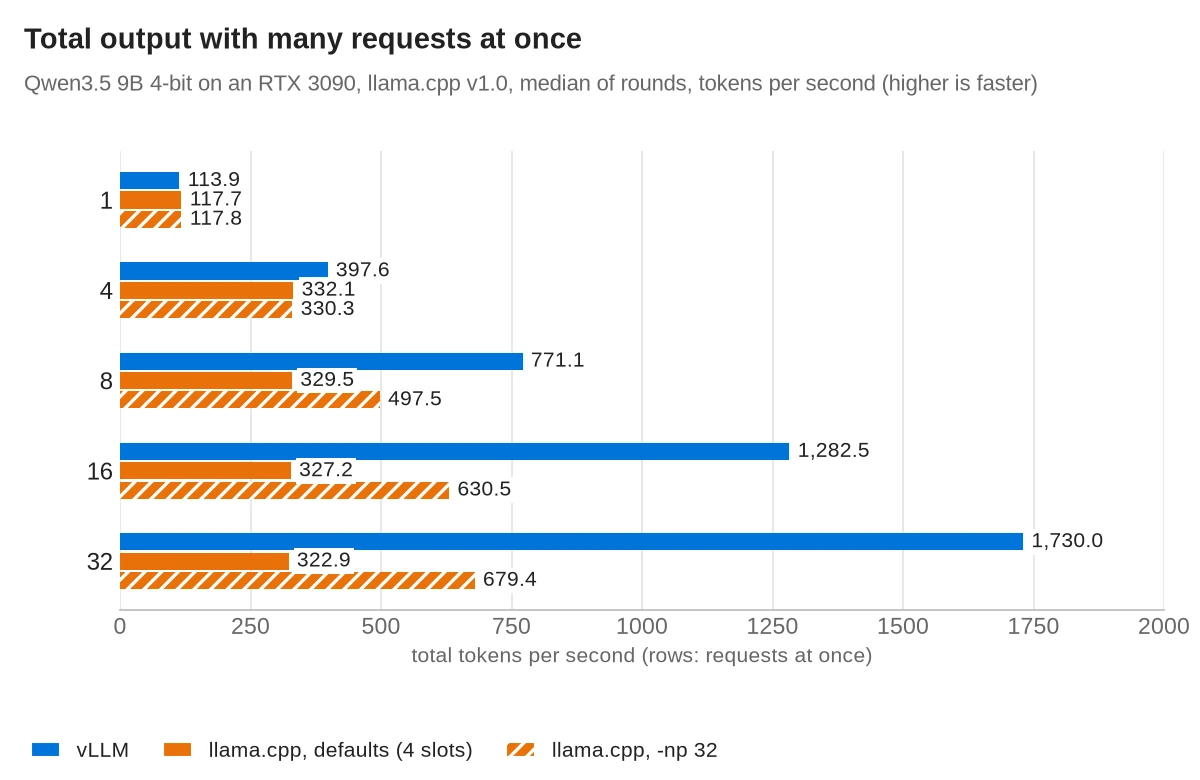
The single-request row is lower than the generation speeds above because it includes the time to read the prompt.
Why: with its defaults, llama-server picked four slots by itself (n_slots = 4 in its log), so four requests ran together and the rest waited in a queue. That is why its total did not grow from 4 requests to 32.
Setting -np raises the number of slots. With 16 or 32 slots, llama.cpp roughly doubled its total at 16 requests, and with 32 slots it reached 679.4 tokens per second at 32 requests.
vLLM's lead came from how much faster each request ran inside a big batch. At 32 requests, each vLLM request generated about 61 tokens per second, while each llama.cpp request generated about 27. vLLM was built for this case. llama.cpp handles it, but less efficiently.
How to set llama.cpp's slots
Three llama-server options decide how it shares the GPU between requests. All three are in the llama-server README:
-np(--parallel) sets the number of slots. The default of -1 lets the server choose; it chose 4 here.-c(--ctx-size) sets the context size. With a unified cache, this is one pool that all slots share.--kv-unifiedmakes all slots share that one pool instead of splitting it evenly. It is on by default only when the number of slots is automatic, so add it when you set-npyourself.
The tested settings were -np 32 -c 262144 --kv-unified and -np 16 -c 131072 --kv-unified.
Tip: pick a slot count close to the number of requests you expect at the same moment. With 16 slots and 32 requests, half of them waited, and the last one waited 7.8 s for its first word.
Waiting time: vLLM started every request within 0.6 s
Total output tells you how much work the server gets done. Waiting time tells you how the server feels to the person behind the last request in the queue. The table shows the longest time any request waited for its first word, and the marker compares vLLM with llama.cpp -np 32.
| Requests at once | vLLM | llama.cpp defaults (4 slots) | llama.cpp -np 32 |
|---|---|---|---|
| 8 | 0.2 s ▲ 0.4 s sooner | 3.4 s | 0.6 s |
| 16 | 0.3 s ▲ 1.0 s sooner | 9.7 s | 1.4 s |
| 32 | 0.6 s ▲ 2.1 s sooner | 22.5 s | 2.7 s |
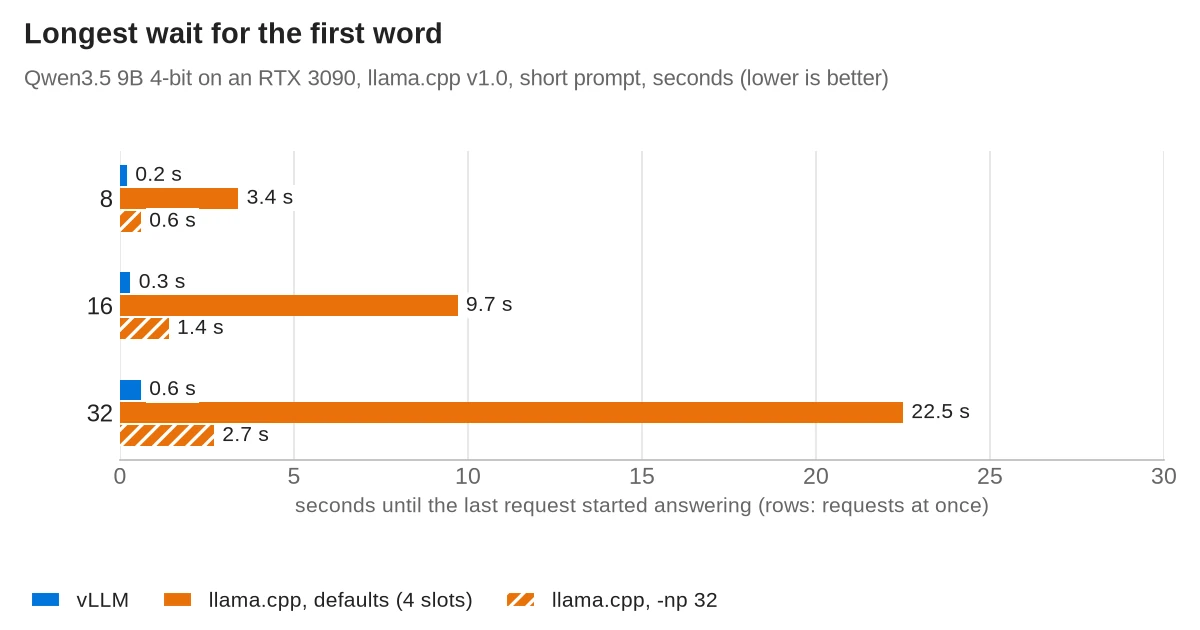
With long prompts the waits grow on both servers, because each prompt has to be read before its answer starts. With 8 requests of about 4,120 tokens each, the last request waited 7.9 s on vLLM and 8.8 s on llama.cpp with 32 slots. Totals were 191.0 and 162.8 tokens per second.
GPU memory and start-up time: similar memory, llama.cpp starts in seconds
| Setup | GPU memory | Ready after docker run |
|---|---|---|
vLLM, --gpu-memory-utilization 0.6 | 12.7 GiB | 72 s |
| llama.cpp defaults | 13.6 GiB | 4.6 s |
llama.cpp -np 16 -c 131072 | 10.1 GiB | 4.8 s |
llama.cpp -np 32 -c 262144 | 15.1 GiB | 2.3 s |
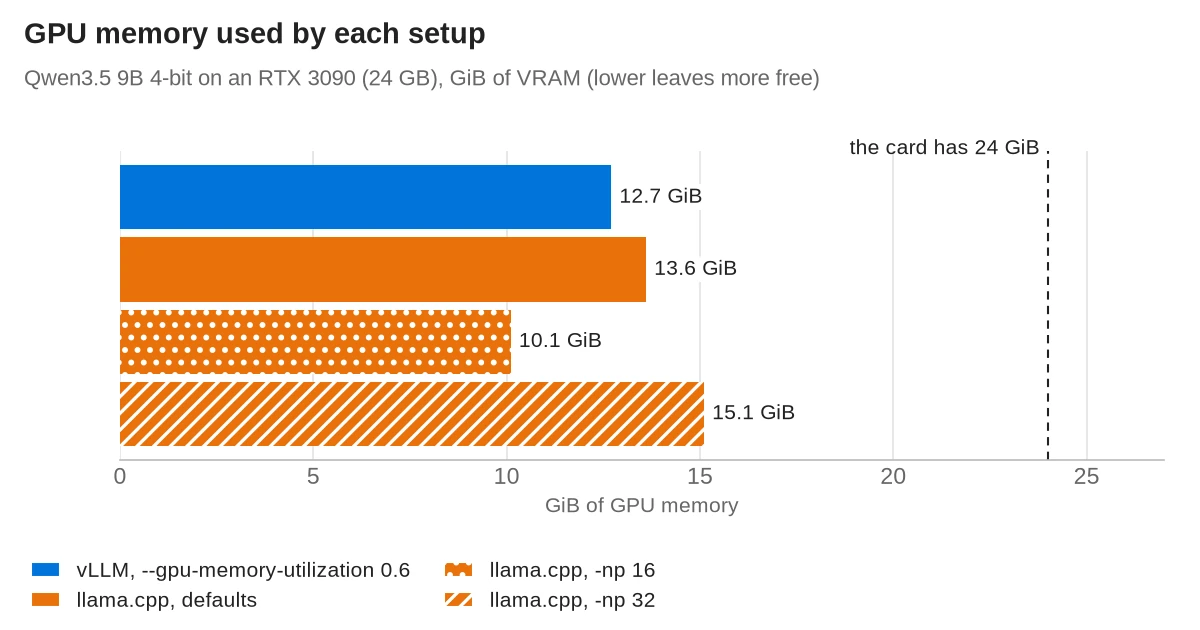
vLLM decides how much memory to take before it loads anything. By default it reserves 92% of the card and fills what the model doesn't need with cache. On the first day of testing, the desktop and a browser held about 2 GiB, and vLLM refused to start:
ValueError: Free memory on device cuda:0 (21.58/23.61 GiB) on startup is less than
desired GPU memory utilization (0.92, 21.72 GiB). Decrease GPU memory utilization or
reduce GPU memory used by other processes.
Tip: on a home server that also drives a screen or runs a second model, lower the limit with --gpu-memory-utilization. In an earlier run on the same machine, 0.6 alone made vLLM 0.33.0 refuse again on this hybrid model, because its default of 256 sequences needed more cache blocks than fit. Adding --max-num-seqs 32 fixed that.
In this setting vLLM held 12.7 GiB, and its speed matched an earlier run with the full reservation: about 115 tokens per second for one request and about 1,730 for 32.
llama.cpp works the other way: it loads the model and sizes the cache from -c and -np, and its --fit option (on by default) adjusts unset values to fit the card. It never asked for more than 15.1 GiB here.
Start-up differs even more. llama-server answered requests 2 to 5 s after the container started. vLLM compiles the model and records CUDA graphs before it serves anything, which took 72 s with its compile cache already on disk. In an earlier run, the first start without that cache took 173 s, and changing a vLLM argument triggered a fresh compile.
Model formats: GGUF for llama.cpp, AWQ for vLLM
The two servers read different files. llama.cpp uses GGUF, a single file with the weights and the chat template. vLLM uses the Hugging Face safetensors format, so a 4-bit model for vLLM is a separate AWQ or GPTQ upload. vLLM can load GGUF, but its docs call that support highly experimental and under-optimized, and it has moved to a separate plugin. This test did not try it.
A 4-bit file is not always the same size on both sides. The AWQ file here is 9.1 GB against 5.7 GB for the Q4_K_M GGUF, because its recipe leaves the embeddings, the output layer and the linear-attention layers unquantized. That recipe uses the AWQ method, and the weights are stored in the compressed-tensors format (its config.json says "quant_method": "compressed-tensors"); vLLM recognised it without a --quantization flag. The model was downloaded once from Hugging Face, at revision e4d2d39, into the local cache that the container mounts. Check the file size, not only "4-bit", when you size a model for your card.
Commands used in this test
Both run in Docker with an NVIDIA GPU once the NVIDIA Container Toolkit is installed. Bind the ports to 127.0.0.1, as below, so other machines on your network can't reach them.
llama.cpp with 32 slots, serving a GGUF file from ~/models. The tag pins v1.0.0, the build tested here. The plain server-cuda tag is rebuilt every day from the newest build, so pin a tag if you want the results above.
docker run -d --name llama --gpus all -p 127.0.0.1:8080:8080 \
  -v ~/models:/models:ro ghcr.io/ggml-org/llama.cpp:server-cuda-v1.0.0-b12359-b1b770d \
  -m /models/Qwen3.5-9B-Q4_K_M.gguf --host 0.0.0.0 --port 8080 \
  -np 32 -c 262144 --kv-unified
vLLM with the lower memory limit. The first volume shares your Hugging Face download cache, and the second keeps the compile cache between restarts:
docker run -d --name vllm --gpus all --ipc=host -p 127.0.0.1:8000:8000 \
  -v ~/.cache/huggingface:/root/.cache/huggingface \
  -v ~/vllm-cache:/root/.cache/vllm \
  vllm/vllm-openai:v0.33.0 --model cyankiwi/Qwen3.5-9B-AWQ-4bit \
  --max-model-len 32768 --gpu-memory-utilization 0.6 --max-num-seqs 32
Both then answer on /v1/chat/completions. Qwen3.5 thinks before it answers unless you turn it off. Both servers accept "chat_template_kwargs": {"enable_thinking": false} in the request; vLLM documents it, and llama-server passed it to the model's template in this test.
Neither server asked for a password here. Set --api-key on llama-server or vLLM if anything else on your network can reach the port, and keep the port closed on your router; the port forwarding guide explains what an open port exposes.
Day-to-day differences
| vLLM | llama.cpp | |
|---|---|---|
| Best at | Many requests at once | One to a few requests, fast start-up |
| Model files | Hugging Face safetensors; AWQ or GPTQ for 4-bit | GGUF |
| Hardware | NVIDIA, AMD and Intel GPUs, and x86, ARM and Apple silicon CPUs | NVIDIA, AMD and Intel GPUs, Apple silicon (Metal), Vulkan, and CPUs |
| GPU memory | Reserves 92% of the card unless told otherwise | Takes what the model, -c and -np need |
| Start-up in this test | 72 s with a warm compile cache | 2 to 5 s |
| License | Apache-2.0 | MIT |
Which one to run on a home server
For most home servers, llama.cpp is the better fit. One person, or a few clients that rarely send requests at the same moment, will get answers at least as fast as from vLLM. llama.cpp starts in seconds and takes only the memory it needs, so it shares the card with a desktop or a second program. If several clients do overlap, set -np to about the number of requests you expect at once and add --kv-unified. If you want model switching and downloads by name on top, Ollama runs the same engine.
vLLM is worth its start-up time and memory planning when many requests really do arrive together: a family or small team sharing one model, an agent that sends dozens of calls in parallel, or batch jobs. At 32 requests at once it did 2.5 times the work of llama.cpp and kept every user's wait under a second. Give it a memory limit if anything else uses the GPU.
Frequently asked questions
Is vLLM faster than llama.cpp?
For one request at a time, no: on an RTX 3090 with Qwen3.5 9B, llama.cpp v1.0 generated about 122 tokens per second and vLLM about 115. With 32 requests at once, vLLM produced about 1,730 tokens per second in total, 2.5 times llama.cpp with 32 slots.
Can llama.cpp serve several users at once?
Yes. llama-server has parallel slots and continuous batching, and the -np option sets the number of slots. Its default chose four slots in this test, so set -np and --kv-unified if more requests arrive together.
Why does vLLM use so much GPU memory?
vLLM reserves 92% of the card by default and fills the space the model doesn't need with cache for requests. Lower it with --gpu-memory-utilization; at 0.6, with --max-num-seqs 32, it used 12.7 GiB in this test.
Can vLLM run GGUF files?
vLLM's docs call its GGUF support highly experimental and under-optimized, and it has moved to a separate plugin. For GGUF files, llama.cpp is the better fit; for vLLM, use an AWQ or GPTQ upload of the model.
Which one starts faster?
llama.cpp. llama-server was ready 2 to 5 s after its container started, while vLLM took 72 s even with its compile cache already on disk.
Does Ollama use llama.cpp?
Yes. Since version 0.30, Ollama runs llama.cpp's server underneath and reads GGUF files.
Sources
- llama.cpp README at v1.0.0 (backends, license)
- llama.cpp: llama-server README at v1.0.0
- llama.cpp v1.0.0 release notes
- llama.cpp license
- llama.cpp Docker build workflow (daily image rebuild)
- vLLM on GitHub (README and license)
- vLLM 0.33.0 release notes
- vLLM 0.33.0 source: default GPU memory utilization
- vLLM docs: GGUF
- vLLM docs: installation
- vLLM docs: reasoning outputs
- vLLM docs: OpenAI-compatible server
- Ollama 0.30.0 release notes
- NVIDIA Container Toolkit install guide
- Qwen3.5-9B GGUF files (unsloth)
- Qwen3.5-9B AWQ 4-bit (cyankiwi)
- Red Hat Developers: llama.cpp vs. vLLM (2026)
- Red Hat Developers: vLLM or llama.cpp (2025)