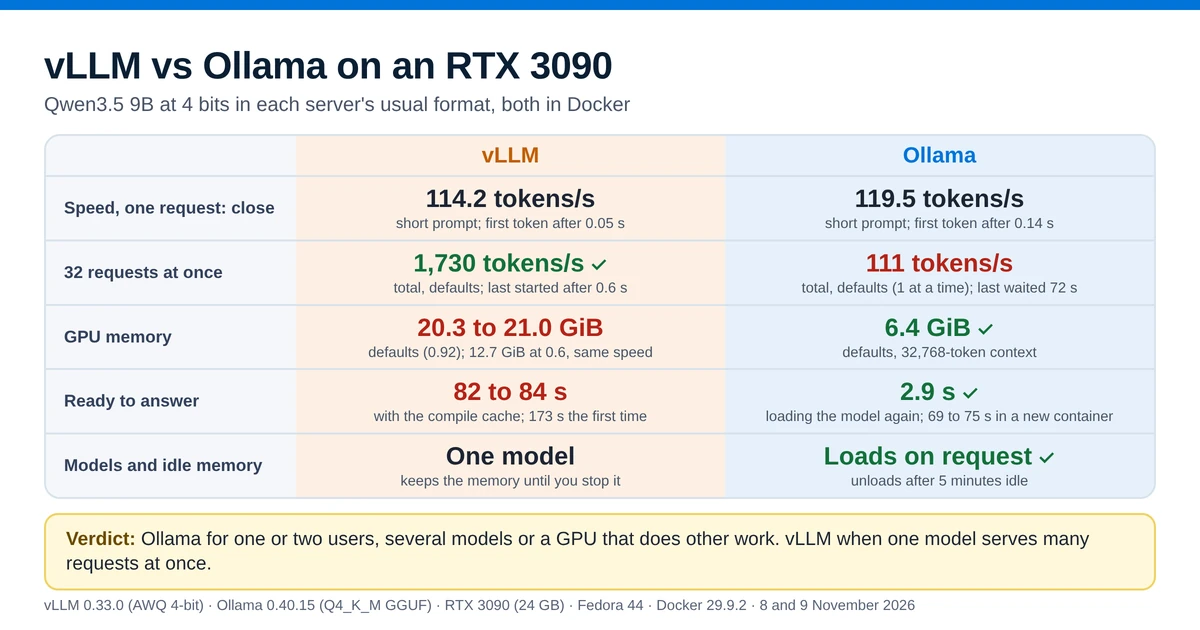
For one person chatting with a model, vLLM and Ollama were about as fast on an RTX 3090: Ollama generated text about 5 percent faster, and vLLM started its answers sooner. With many requests at once, vLLM produced nearly 16 times as much text per second as Ollama with its default settings. In return, vLLM takes almost the whole graphics card, and it needs more than a minute to start.
What is vLLM, and how is it different from Ollama?
vLLM is an open-source inference server that serves a model to many users at once through an OpenAI-compatible API. Its README names its two main techniques: PagedAttention, which manages the model's working memory in small blocks, and continuous batching, which adds new requests to the batch the GPU is already working on. Ollama is a model manager and server for one machine: ollama pull downloads a model by name, Ollama loads it when a request arrives and unloads it when it sits idle. Since version 0.30, Ollama runs llama.cpp's server underneath, and it reads GGUF model files. Ollama vs llama.cpp compares the two on the same RTX 3090, and vLLM vs llama.cpp runs the same vLLM version and model file against llama.cpp v1.0.
This page compares the two as servers on a home machine, in Docker, with one model on one consumer GPU. Facts about the tools come from the pages listed under Sources at the end, and every other figure was measured in this test. The test scripts and raw results are on GitHub.
The short answer
| vLLM | Ollama | Better | |
|---|---|---|---|
| Speed, one request | 114.2 tokens/s; first word after 0.05 s | 119.5 tokens/s; first word after 0.14 s | Close; Ollama about 5 percent faster, vLLM 0.1 s sooner to start |
| 32 requests at once | About 1,730 tokens/s in total | About 111 tokens/s with its defaults, one request at a time; the last of 32 waited 72 s for its first word | vLLM, by nearly 16 times |
| GPU memory | About 21 GiB with its default of 92 percent; 12.7 GiB at the same speed with lower settings | 6.4 GiB | Ollama |
| Start-up | 173 s the first time, about 82 s later on | Within 3 s once the model had been loaded once | Ollama |
| Models and idle memory | One model per server; keeps the memory until you stop it | Switches between models and unloads them when idle | Ollama |
Verdict: run Ollama if one or two people use the server, if you switch between models, or if the GPU also does other work. Run vLLM if one model serves many requests at once, and plan for a fixed share of the GPU and a start-up of one to three minutes.
Is vLLM faster than Ollama?
Key point: not for one user. In this test Ollama generated text about 5 percent faster than vLLM, and vLLM started answering sooner, by 0.1 s on a short prompt. Both differences are too small to notice in a chat window.
vLLM is much faster when several requests arrive together. Its continuous batching runs them through the GPU in one batch, and each request kept most of its own speed. At 16 requests, each one still generated 88 tokens per second, and the total was 1,272. Ollama answers one request at a time by default. With more parallel slots, the number of requests Ollama runs at the same time, it reached about 490 tokens per second at 16 requests, but the result changed a lot from one round to the next.
Comparisons that show vLLM far ahead, such as Red Hat's benchmark with 793 against 41 tokens per second, measure the many-user case on data-center cards. This test found the same direction on a home card. It does not mean vLLM is faster for a single person at home.
How the test was run
- Machine: Fedora 44, Docker 29.9.2, an NVIDIA RTX 3090 with 24 GB (driver 615.78.08), an AMD Ryzen 9 5900X and 62 GB of RAM. The desktop used about 1.3 GiB of the GPU's memory during the test. GPU memory on this page is in GiB, as
nvidia-smiand vLLM report it. - vLLM: the
vllm/vllm-openai:v0.33.0image, the latest release on 2 November 2026, with PyTorch 2.14 and CUDA 13.0. It ran with--max-model-len 32768and its other defaults. - Ollama: the
ollama/ollama:0.40.15image, released on 3 November 2026, with its defaults unless a section says otherwise. - Models: Qwen3.5 9B in each server's usual 4-bit format. Ollama loaded
Qwen3.5-9B-Q4_K_M.gguf(5.7 GB, or 5.3 GiB). vLLM loadedcyankiwi/Qwen3.5-9B-AWQ-4bit(9.1 GB, or 8.4 GiB), the most downloaded AWQ version of the model. They are different files, so the comparison is between two ways of running the same model at 4 bits, and this test did not compare the quality of their answers. - Requests: a short prompt of about 70 tokens and a long prompt of about 4,120 tokens. One request at a time generated 512 tokens on the short prompt and 256 on the long one; in the tests with several requests, each request generated 256 tokens. Every prompt started with a random ID, so neither server could reuse a cached prompt. Thinking was turned off and the temperature was 0.
- Measurements: the client measured everything the same way for both servers. Time to first token runs from sending the request to the first word of the answer. Generation speed is the number of tokens divided by the time between the first and the last word.
- Heat: before each measured round the script waited until the GPU had cooled to 50 °C, because a hot RTX 3090 slows itself down. Single-request figures are the median of five rounds, and the rest are the median of three.
- Script: the benchmark client is available for download, so you can run the same test on your own card.
vLLM vs Ollama benchmark, one request at a time: close, with Ollama slightly ahead
| Qwen3.5 9B, one request | vLLM 0.33.0 | Ollama 0.40.15 |
|---|---|---|
| Generation, short prompt | 114.2 tok/s | 119.5 tok/s |
| Generation, long prompt | 111.6 tok/s | 117.6 tok/s |
| Time to first token, short prompt | 0.05 s | 0.14 s |
| Time to first token, 4,120-token prompt | 0.98 s | 1.08 s |
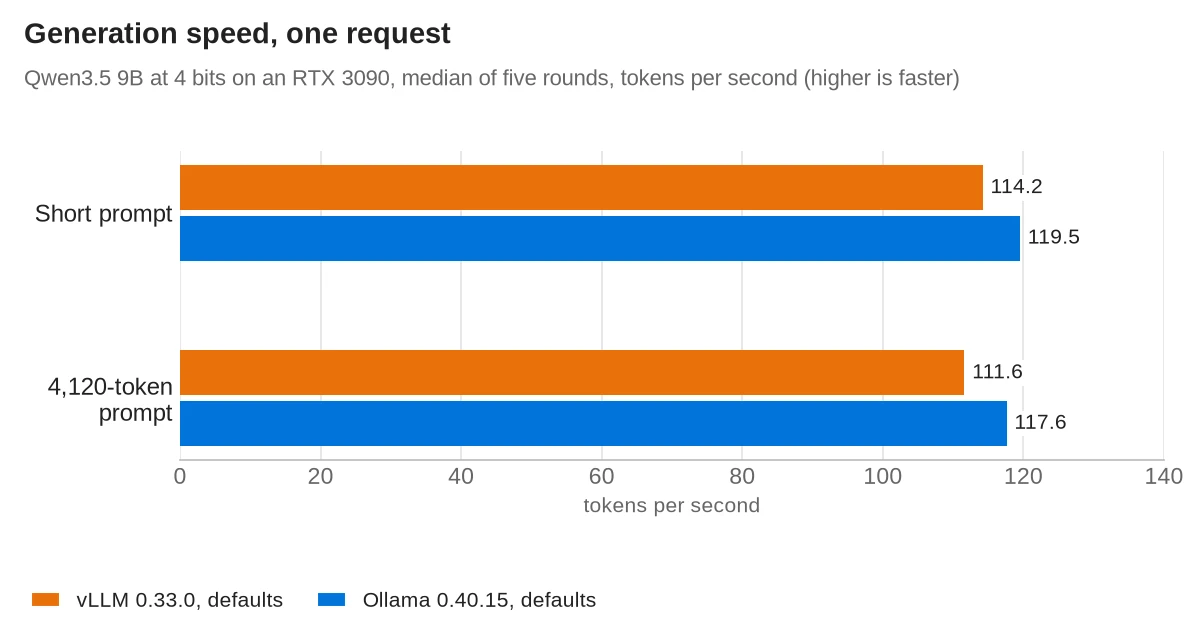
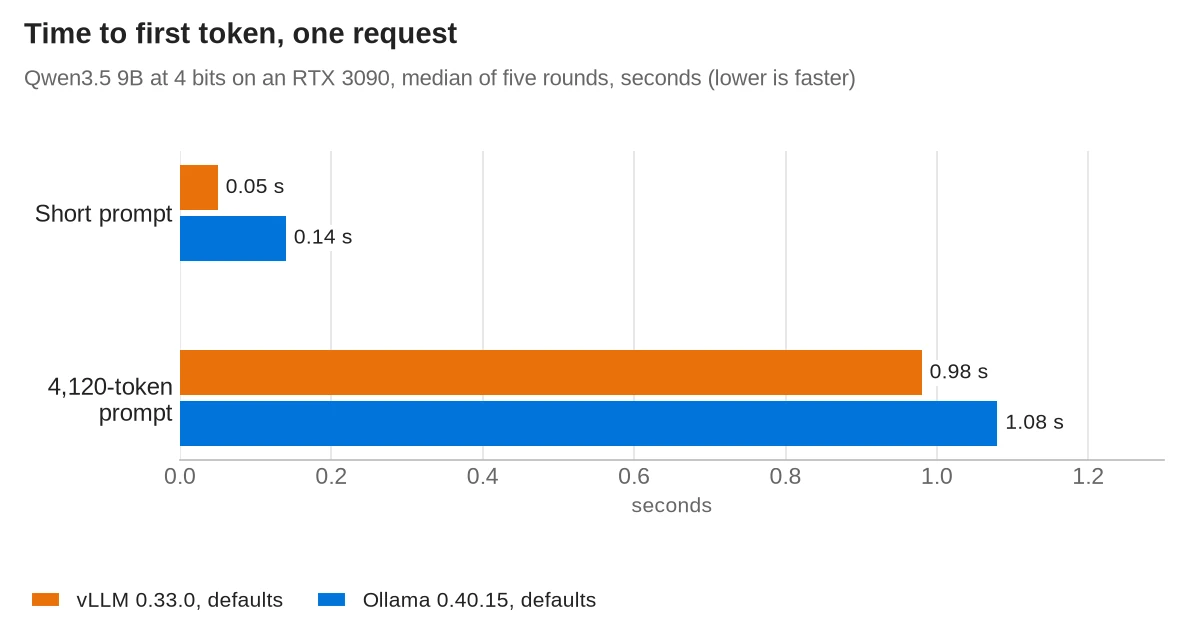
The five rounds of each test were within about 1 percent of each other, so the gap of about 5 percent in generation speed is real for these two model files. The AWQ file is larger, because its recipe leaves some layers unquantized, and this test did not check whether that explains the gap.
On the long prompt both servers waited about one second before the first word, so vLLM did not read long prompts faster than Ollama.
Several requests at once: continuous batching gave vLLM nearly 16 times the output
A home server can have several clients: a chat window, an agent that sends many requests, a script that summarizes documents, or a few family members. This test sent 1 to 32 requests at the same moment and measured how many tokens per second came back in total. Each request asked for 256 tokens.
| Requests at once | vLLM, defaults | Ollama, defaults | Ollama, 16 slots of 4,096 tokens |
|---|---|---|---|
| 1 | 113 tok/s | 116 tok/s | 113 tok/s |
| 4 | 397 tok/s | 114 tok/s | 265 tok/s (92 to 280) |
| 8 | 765 tok/s | 113 tok/s | 248 tok/s (192 to 344) |
| 16 | 1,272 tok/s | 112 tok/s | 488 tok/s (480 to 542) |
| 32 | 1,730 tok/s | 111 tok/s | 482 tok/s (482 to 515) |
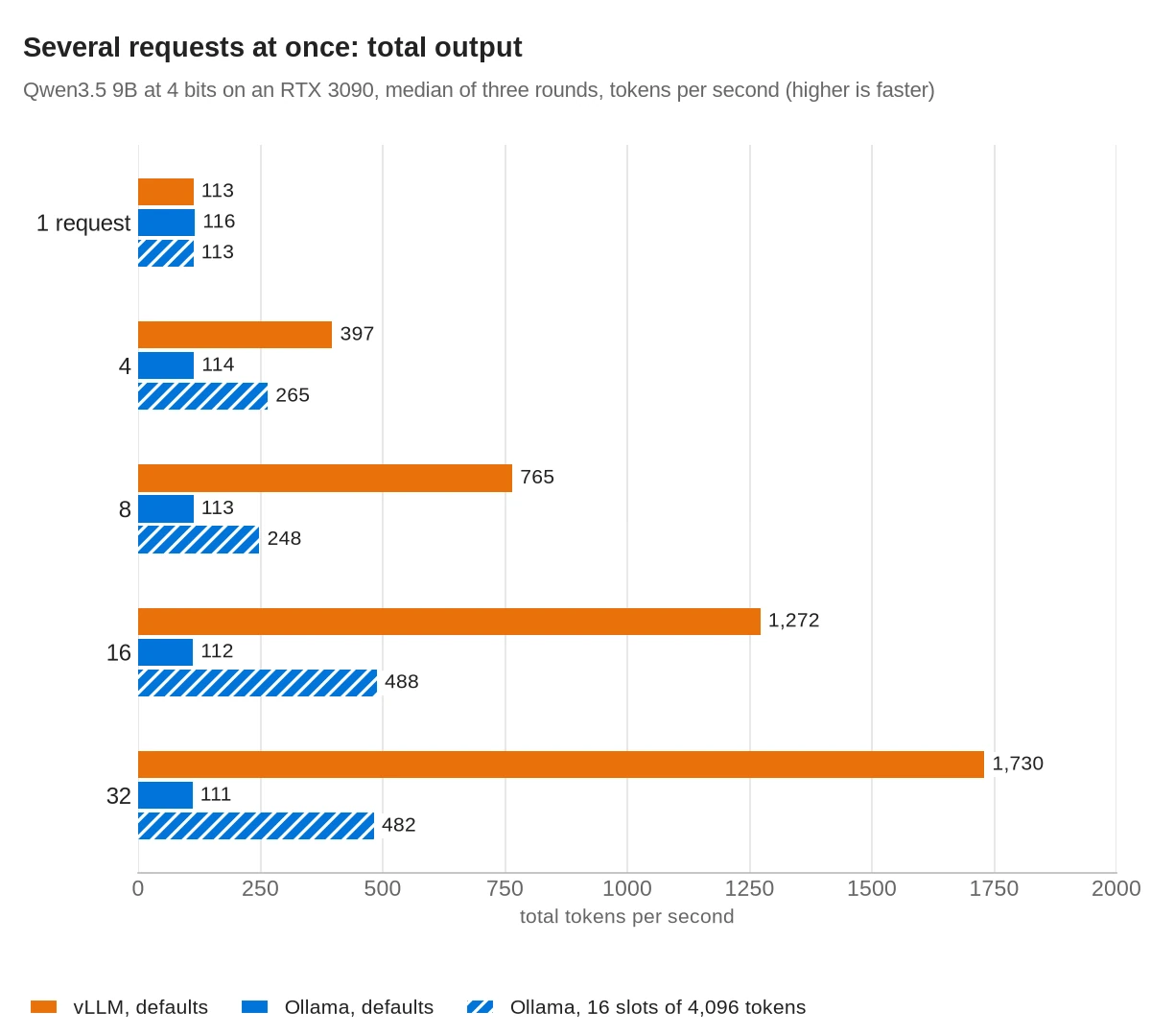
Each figure is the median of three rounds; for the tuned Ollama setup the range of the three rounds is in brackets. The totals include each request's wait for its first token, and the per-request speeds below do not. That is why a total is a little lower than the per-request speed times the number of requests, and why the totals for one request are a little lower than in the previous table.
- vLLM gave each request most of its single-user speed: 103 tokens per second each at 4 requests, 88 at 16 and 61 at 32. The last of 32 requests started answering after 0.6 s. Its docs say chunked prefill is on by default: new prompts are read in pieces between the generation steps of running requests.
- Ollama with its defaults queued the requests.
OLLAMA_NUM_PARALLELdefaults to 1, so each request ran at full speed but only after the ones before it had finished. With 32 requests, the last one waited 72 s for its first word. - Ollama with
OLLAMA_NUM_PARALLEL=16andOLLAMA_CONTEXT_LENGTH=4096fit the model in 8.0 GiB and reached the totals in the last column. At 32 requests, 16 ran and 16 waited, and the last one started answering after 10.6 s. The Ollama FAQ says the memory needed grows withOLLAMA_NUM_PARALLELtimesOLLAMA_CONTEXT_LENGTH.
Why: OLLAMA_NUM_PARALLEL=16 alone made Ollama slower. Ollama gave each of the 16 slots the default 32,768-token context, which added up to 524,288 tokens. That did not fit on the card, so ollama ps showed 13 percent of the model on the CPU, and one request ran at 45 tokens per second.
Long prompts cut both servers' totals, because reading a prompt takes GPU time too. With 8 requests of 4,120 tokens each, vLLM produced 190 tokens per second in total and the last request waited 8 s for its first word. Ollama with its defaults produced 77, and its last request waited 24 s.
Ollama passes OLLAMA_NUM_PARALLEL to llama.cpp's server as its number of slots. The vLLM vs llama.cpp test measured llama.cpp itself with 16 and 32 slots at up to 32 requests at once, and LM Studio vs Ollama compares four requests at once in Ollama and in LM Studio, which runs four slots by default.
GPU memory: vLLM takes the card
vLLM reserves a fixed share of the GPU's memory when it starts. The share is set by --gpu-memory-utilization, which defaults to 0.92 in version 0.33.0. vLLM saw 23.6 GiB on the RTX 3090, so its budget was 21.7 GiB, and memory that other programs use counts against it. After loading the weights and its working buffers, vLLM fills the rest with KV cache, the memory that holds each request's context. It keeps all of it while idle. Ollama loads the model and a context of the size it chose, and unloads the model after five minutes without requests.
| Setup | GPU memory | Context it can hold |
|---|---|---|
| vLLM, defaults (0.92) | 20.3 to 21.0 GiB | 315,332 tokens in total, or 9.6 requests of 32,768 tokens |
vLLM, 0.6 and --max-num-seqs 32 | 12.7 GiB | 110,176 tokens in total |
| Ollama, defaults | 6.4 GiB | 32,768 tokens, one request at a time |
| Ollama, 16 slots of 4,096 tokens | 8.0 GiB | 4,096 tokens per request |
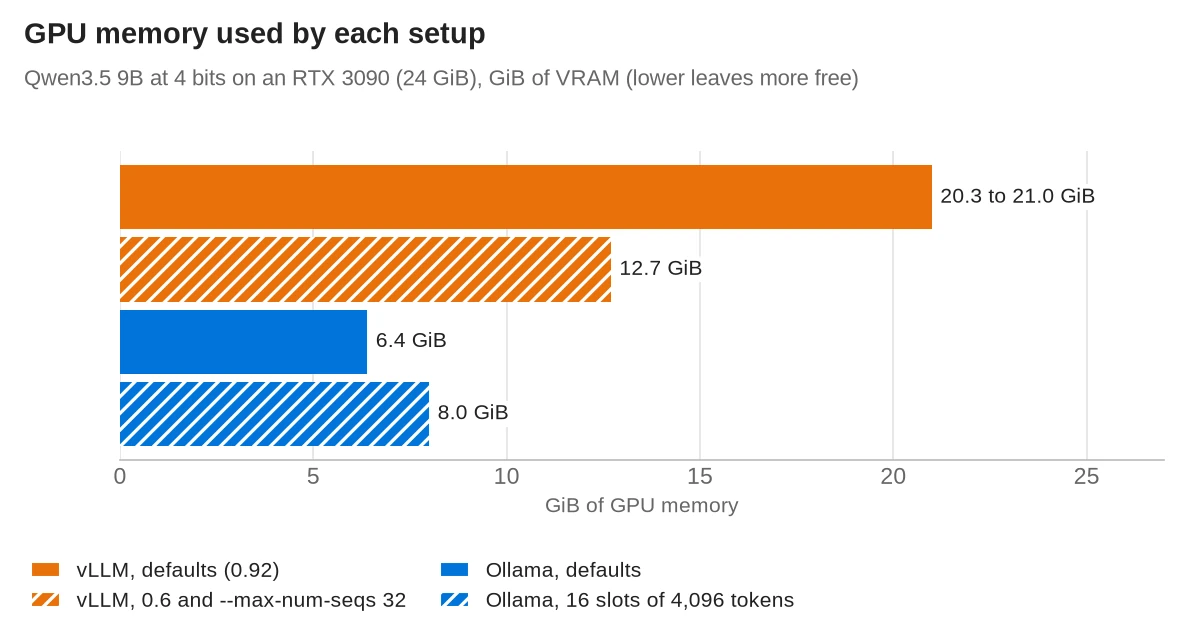
vLLM's log said the model weights took 8.4 GiB. Most of the rest went to the KV cache, and the remainder to CUDA graphs and buffers. With the desktop's 1.3 GiB, the card had 21.6 of its 24 GiB in use, so nothing else of any size fits while vLLM runs with its defaults: not a second model, not an image generator and not Ollama.
Making vLLM fit next to other work
The engine arguments page says --gpu-memory-utilization is a per-instance limit, so two servers on one card can use 0.5 each. With this model, the lower values failed until other settings changed with them:
- 0.5: vLLM refused to start. It said one request of 32,768 tokens needed 1.11 GiB of KV cache and only 0.78 GiB was left, and it suggested a maximum context of 22,176 tokens. Lowering
--max-model-lenis the fix for that error. - 0.6: vLLM refused to start with a different error: its default of 256 requests per batch did not fit. Qwen3.5 needs a cache block per request for some of its layers, and only 196 were left. vLLM sets
--max-num-seqsto 256 on GPUs with less than 70 GiB. - 0.6 with
--max-num-seqs 32: vLLM started, used 12.7 GiB, and ran at the same speeds as with its defaults: 114 tokens per second for one request and 1,728 in total for 32.
Tip: on a 24 GB card you can give vLLM about 13 GiB for a 9B model and lose no speed for up to 32 users: start it with --gpu-memory-utilization 0.6 --max-num-seqs 32.
The conserving memory guide lists the other settings that lower its use.
Start-up time: vLLM needs one to three minutes
vLLM prepares the GPU before it accepts requests: it compiles the model with torch.compile, measures memory with a test run and records CUDA graphs. Its log showed the time each step took:
| Start | Ready after |
|---|---|
| vLLM, first start | 173 s (torch.compile 20 s, test run 52 s, CUDA graphs 27 s, loading weights 4 s; about 40 s before the engine started, and the rest in smaller steps) |
| vLLM, later starts with the compile cache | 82 to 84 s |
| vLLM, after changing a start-up setting | 157 s, because it compiled again |
vLLM with --enforce-eager | 107 s |
| Ollama, first answer after the container started | 69 to 75 s, of which loading the model was 31 to 35 s |
| Ollama, loading the model again | 2.9 s |
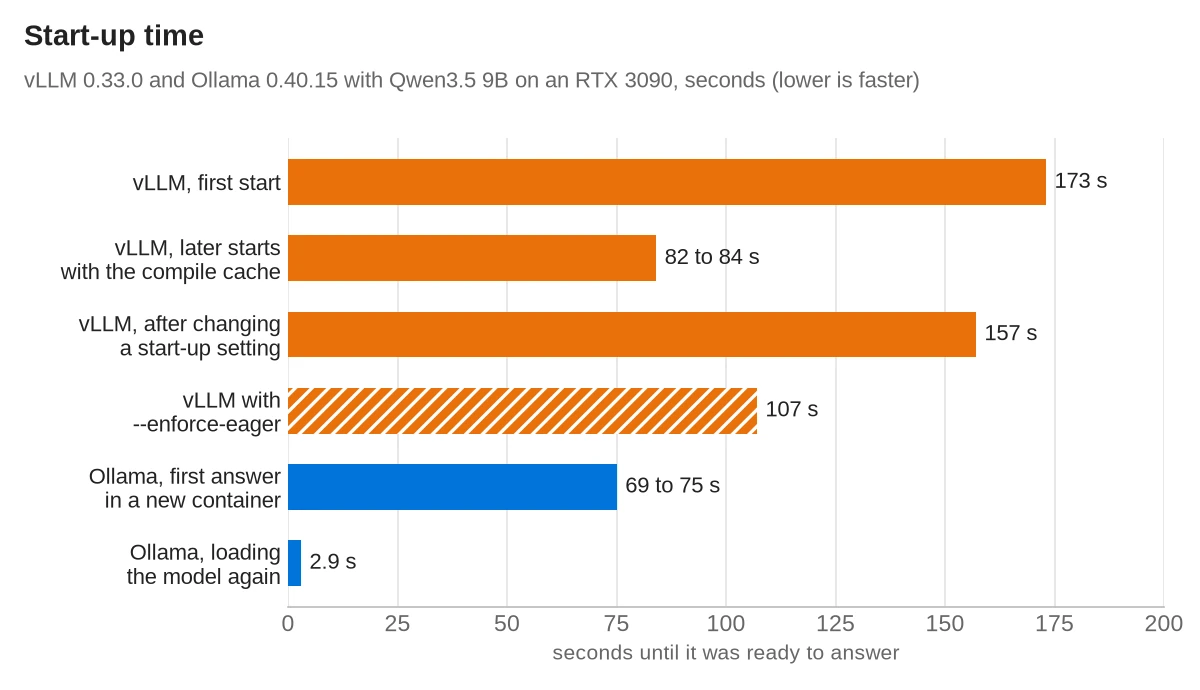
vLLM's Docker docs say to mount /root/.cache/vllm so the compiled model is kept between containers. With the cache, the test run fell from 52 s to under 1 s. The cache only helps while the settings stay the same: starting it with HF_HUB_OFFLINE=1 changed the model's path, and vLLM compiled everything again.
The --enforce-eager flag skips compilation and CUDA graphs. vLLM was then ready after 107 s, which is faster than a first start but slower than a start with the compile cache. It cost a lot of speed: one request fell from 114 to 30 tokens per second, and 16 requests from 1,272 to 440 in total. Leave it off on a server that runs for days.
Ollama's API answered 4 to 6 s after the container started, and it loads a model on the first request. In each new container the first answer took more than a minute, and loading the model was only about half of that. Loading the model again after ollama stop took 2.9 s.
Power at idle: the same 33 to 34 W
With either server loaded and waiting, the card drew 33 to 34 W from 30 s after the last request. After Ollama had unloaded its model, it drew 33 W. vLLM holding 21 GiB of memory did not add to the power draw.
So the cost of keeping vLLM running is the memory it holds, not electricity. Ollama gives the memory back after five minutes, and its next request waits about 3 s for the reload.
Model files and vLLM quantization
Ollama runs GGUF files. vLLM runs models in the Hugging Face safetensors format, and for 4-bit weights it uses formats such as AWQ, GPTQ and compressed-tensors. Its quantization page lists which formats work on which GPUs. On Ampere cards such as the RTX 3090, AWQ, GPTQ and INT8 work, but FP8 W8A8 does not.
- A 4-bit vLLM file can be larger than the GGUF. The AWQ file here is 9.1 GB against 5.7 GB for the Q4_K_M GGUF, and its weights took 8.4 GiB of GPU memory. Its
recipe.yamlleaves the embeddings, the output layer, the linear-attention layers and the vision part unquantized. Check the file size, not only "4-bit", when you size a model for your card. - vLLM can load GGUF, but not well. Its GGUF page calls the support highly experimental and under-optimized, and it has moved to a separate plugin. This test did not try it. If you have GGUF files, Ollama or llama.cpp is the better fit.
- New models need a matching file. For vLLM, look for an AWQ or GPTQ version of the model on Hugging Face. Ollama can import GGUF and safetensors files.
Running vLLM and Ollama in Docker
Both run in Docker with an NVIDIA GPU once the NVIDIA Container Toolkit is installed. Bind the ports to 127.0.0.1, as below, so other machines on your network can't reach them.
vLLM, from its Docker guide, with the settings from the memory section. The image runs vllm serve, and the arguments after the image name go to it. The model downloads into ~/.cache/huggingface on the first start.
docker run -d --name vllm --gpus all --ipc=host -p 127.0.0.1:8000:8000 \
  -v ~/.cache/huggingface:/root/.cache/huggingface \
  -v ~/.cache/vllm:/root/.cache/vllm \
  vllm/vllm-openai:v0.33.0 \
  --model cyankiwi/Qwen3.5-9B-AWQ-4bit --served-model-name qwen35-9b \
  --max-model-len 32768 --gpu-memory-utilization 0.6 --max-num-seqs 32
vLLM 0.33.0 logged that --model will be removed in a future version; the model name can also go first, right after the image name. The docs say --ipc=host (or --shm-size) is needed because PyTorch shares data between processes through shared memory. Wait until curl 127.0.0.1:8000/health succeeds before sending requests. The container used 5.1 GB of system RAM.
Ollama, from its Docker guide, then a model from its library:
docker run -d --name ollama --gpus all -p 127.0.0.1:11434:11434 \
  -v ollama:/root/.ollama ollama/ollama:0.40.15
docker exec ollama ollama pull qwen3.5:9b
If several clients use Ollama at once, add -e OLLAMA_NUM_PARALLEL=16 -e OLLAMA_CONTEXT_LENGTH=4096, the tuned setup from the test, or other values. The memory grows with the two numbers multiplied together, and ollama ps should show 100 percent GPU.
vLLM arguments worth knowing
--max-model-len: the longest context per request. Without it, vLLM uses the model's own maximum, which is 262,144 tokens for Qwen3.5.--gpu-memory-utilization: the share of GPU memory vLLM takes, 0.92 by default in 0.33.0.--max-num-seqs: how many requests run in one batch, 256 by default on cards under 70 GiB.--served-model-name: the name clients send in themodelfield.--enforce-eager: skips compilation and CUDA graphs; much slower in this test.--api-key: requires a key on the API. The server docs say it protects the/v1routes but not every route, so don't rely on it alone. Keep the port off your network; the port forwarding guide explains what an open port exposes.
Qwen3.5 thinks before it answers unless you turn it off. In vLLM, send "chat_template_kwargs": {"enable_thinking": false} with the request. In Ollama's own API, send "think": false.
Day-to-day differences
| vLLM | Ollama | |
|---|---|---|
| Models per server | One; run a second server for a second model | Loads models on request; up to 3 per GPU by default |
| Getting models | A Hugging Face repository name | ollama pull by name, or import a GGUF file |
| Idle model | Stays in GPU memory until you stop the server | Unloaded after 5 minutes by default |
| Hardware | NVIDIA, AMD and Intel GPUs, and x86, ARM and Apple silicon CPUs; Apple GPUs through the separate vLLM-Metal project. This test used only the NVIDIA build. | NVIDIA, AMD and Apple GPUs, Vulkan, and CPUs |
| API | OpenAI-compatible on port 8000, plus Anthropic-style /v1/messages | Its own API on port 11434, plus OpenAI-compatible /v1 endpoints |
| Start-up | 80 to 170 s on the RTX 3090 | A few seconds, plus the model load |
| License | Apache-2.0 | MIT |
Which one to run on a home server
Run Ollama if one or two people use the server, if you switch between models, or if the GPU also does other work. It was as fast as vLLM for one user, it starts quickly, and it gives the memory back when idle. Apps built for Ollama's own API, such as the OpenClaw setup, work with it directly.
Run vLLM if one model serves many requests at once: a household or a small team on one chat server, an agent that sends requests in parallel, or batch jobs over many documents. Set --gpu-memory-utilization, --max-model-len and --max-num-seqs to fit your card, mount the compile cache, and plan for a start-up of one to three minutes.
Neither server makes one request faster on the same card. If single answers are too slow, a smaller model or a faster GPU helps more; choosing home server hardware covers that side. In llama.cpp, speculative decoding also helps: in the llama.cpp v1.0 test it made the 27B model write 52 to 55% faster on this card.
Frequently asked questions
What is vLLM?
vLLM is an open-source server that runs language models on GPUs and serves them through an OpenAI-compatible API. It uses PagedAttention and continuous batching to serve many requests at once, and it is licensed under Apache-2.0.
Is vLLM faster than Ollama?
For one request at a time, no: on an RTX 3090 with Qwen3.5 9B, Ollama generated about 120 tokens per second and vLLM about 114. With 32 requests at once, vLLM produced about 1,730 tokens per second in total, while Ollama with its defaults stayed at about 111.
How much GPU memory does vLLM use?
By default vLLM 0.33.0 plans for 92 percent of the GPU's memory, and on a 24 GB RTX 3090 it held about 21 GiB, which it keeps while idle. With --gpu-memory-utilization 0.6 and --max-num-seqs 32 it used 12.7 GiB for a 9B model and ran at the same speed.
Can vLLM run GGUF models?
vLLM's docs call its GGUF support highly experimental and under-optimized, and it has moved to a separate plugin. For 4-bit models on vLLM, use AWQ, GPTQ or compressed-tensors files; for GGUF files, Ollama or llama.cpp is the better fit.
Can vLLM run on a CPU or a Mac?
vLLM's installation docs list CPU support for x86, ARM and Apple silicon, and Apple GPUs through the separate vLLM-Metal project. On GPUs it supports NVIDIA, AMD and Intel cards.
Should I use vLLM or Ollama on a home server?
Use Ollama if one or two people use the server, you switch models, or the GPU does other work too. Use vLLM if one model serves many requests at once and you can give it a fixed share of the GPU and a start-up of one to three minutes.
Sources
- vLLM on GitHub (README and license)
- vLLM 0.33.0 release
- vLLM 0.33.0 source: GPU memory default
- vLLM 0.33.0 source: batch size defaults
- vLLM docs: Docker
- vLLM docs: engine arguments
- vLLM docs: optimization and tuning
- vLLM docs: conserving memory
- vLLM docs: quantization
- vLLM docs: GGUF
- vLLM docs: OpenAI-compatible server
- vLLM docs: reasoning outputs
- vLLM docs: installation
- vLLM docs: FAQ
- Ollama on GitHub (license)
- Ollama 0.40.15 release
- Ollama docs: FAQ
- Ollama docs: importing a model
- Ollama docs: hardware support
- Ollama docs: OpenAI compatibility
- Ollama docs: Docker
- NVIDIA Container Toolkit install guide
- Qwen3.5-9B AWQ 4-bit (cyankiwi)
- Qwen3.5-9B GGUF files (unsloth)
- Red Hat Developers: Ollama vs. vLLM benchmark